How to Make the Storm II AI Crowd Dance Video (Whole Crowd, Not Just the Lead)
The quickest Storm II AI videos change one thing: your photo goes in and you become the white-shirted lead. We wanted to know what happens if you change everyone and keep the real film around them. So we took the 30-second clip and reshot it with a grandma choir in lilac cardigans in every row, and a grandfather holding a cup of tea where the lead smokes a cigarette. Same shots, same cuts, same beat.
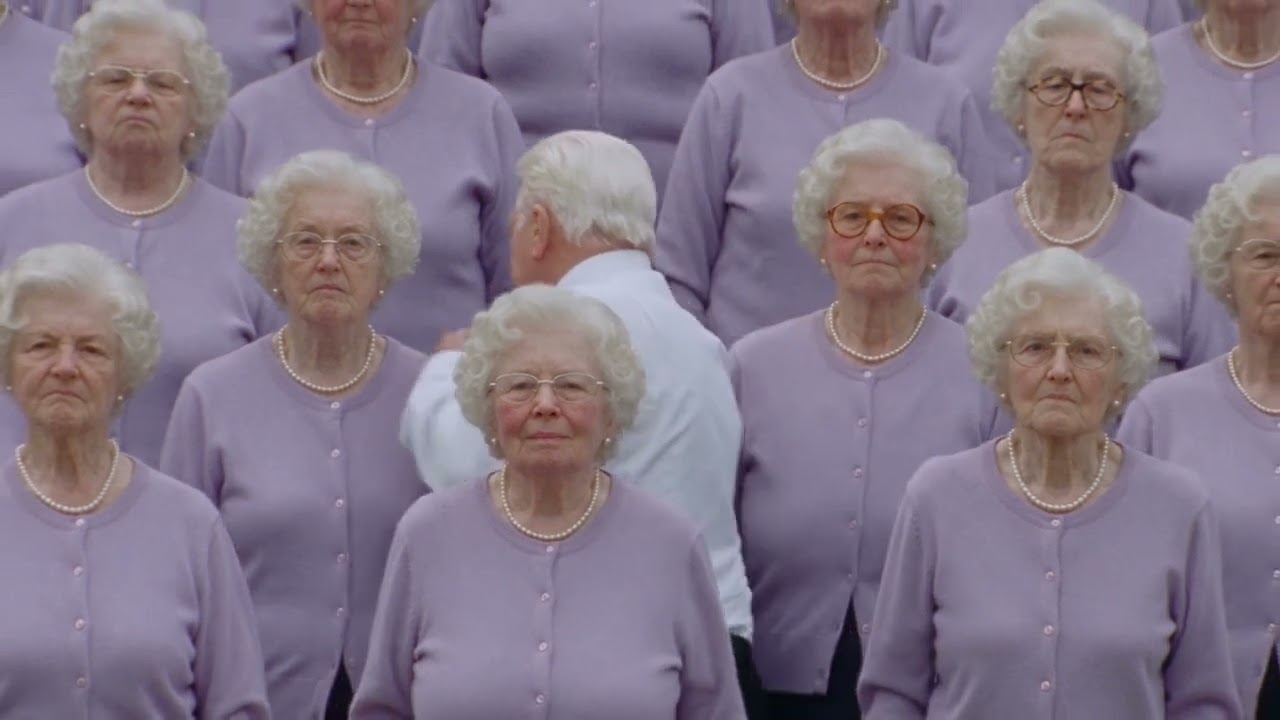
Watch it on YouTube: STORM II, but it's a grandma choir.
This guide covers the three ways to make one, the exact brief we wrote, and what our first try got wrong. It also covers the two things the model wouldn't do however we asked, and the music question you should answer before you post.
A disclosure first: we make Riffkit, and this video came out of its Swap mode.
What the Storm II trend is
STORM is a music video and double single by GENER8ION (the French producer Surkin with director Romain Gavras), starring Yung Lean. It came out on April 24, 2026. It's set in an all-boys British boarding school, the class of 2034, and Damien Jalet choreographed it. The second part, STORM II, turns euphoric: a school photograph where rows of students move as one around a lead who barely moves at all.
That frame is what the AI trend borrows. The formation stays; who is standing in it changes. The contrast is what makes it work: a completely still figure in the middle of a crowd that jerks, turns and folds forward on the same beat.
Three ways to make one
Photo templates. Tools like Vmake and LightX have a Storm II effect. You upload one clear photo, the tool puts that face in the lead role, and you download the result. It's the fastest route if all you want is you in the middle.
Prompting a new crowd dance. Dreamina's guide has you paste one long text prompt into a video model and generate the whole scene from scratch: the lead, every dancer, the formation and the camera. You get full control over who is in it, but the choreography and the cuts are the model's version of Storm II, not the film's, so expect to iterate on formation drift and timing.
Reshooting the clip. You start from the clip itself and describe what should change. Anything in frame is fair game: the lead, every member of the crowd, what they wear and what they hold. The camera, the cuts, the choreography and the timing stay exactly where the original has them, because they come from the original. That's the route we took, and the rest of this guide is about it.
How to make it, step by step
1. Bring the clip. Open Riffkit Swap and paste a TikTok link to the Storm II clip, or upload the file. Swap takes sources up to 45 seconds; the trend clip is about 30. A longer source is turned away rather than trimmed, so cut it first if you need to.
2. Decide who the lead is. If you pick one of your digital characters, that person replaces the lead. If you don't pick one, the original person stays unless your brief says otherwise. So either pick a character or describe the new lead in words, as we did.
3. Write what should change. This box is the whole creative job. Here is the brief we used, word for word:
Replace every member of the crowd with grandmothers in their seventies wearing identical lilac cardigans, pearl necklaces and neat bright-white curly perms, standing in the same rigid rows. Every face in the crowd is an elderly woman for the whole video, including the final frenzy. From the moment the music swells they open their mouths wide and sing along in unison, then headbang and throw their arms up in the same frenzy at the climax. The main character becomes an unbothered grandfather in the same white shirt and loose striped tie; instead of a cigarette he holds a cup of hot tea, sipping it where the original takes a drag, with a visible curl of steam rising from the cup where the smoke was. Keep every shot, cut, pose and beat where the original has them.
4. Draft cheap, then render the keeper. We ran a 480p draft first on Seedance 2.5, which costs half as much per second as 720p, fixed the brief, then rendered the final at 720p. The per-second rate is shown next to each engine before anything renders.
5. Wait and check. Our 30-second final took about ten minutes. It comes back at the source's own shape, which for Storm II means landscape.
What we learned from the first draft
The 480p draft got the big things right on the first try: every shot, cut and pose landed where the original has them, and the tea replaced the cigarette. It got three details wrong, and each fix is a rule you can reuse.
- Name the climax. In the draft, young faces crept back into the back rows during the final frenzy. A brief that only says "replace the crowd" holds for the calm opening rows and slips when the frame fills with motion. Adding "for the whole video, including the final frenzy" fixed it: in the final, every face at the climax is a grandmother.
- Say the exact colour. "Neat silver perms" came out a greyish green. "Bright-white curly perms" came out bright white.
- Make small effects big. "A soft puff of steam" never showed up. "A visible curl of steam rising from the cup" put steam over the cup a few seconds in.
Two things in the draft brief worked from the start and are worth copying. Map each prop to the original's action, not just to the object: "sipping it where the original takes a drag" put the tea in his hand on exactly the beats where the cigarette was. And end with the anchor sentence: "Keep every shot, cut, pose and beat where the original has them" tells the model which parts are not up for reinterpretation.
What it wouldn't do
Sing in unison. We asked twice, first "they mouth the song in unison", then "they open their mouths wide and sing along". Neither run showed it. A whole crowd mouthing words in time with a song was more than the model would do from a sentence, at least in our runs. The grandmothers headbang and throw their arms up on cue; they just don't sing.
Change the look of the whole film. We also tried a claymation version. It came back as live action, with only the props changed. Swap changes what's in the video, not how the video looks. If you want an anime or stop-motion Storm II, use a style tool; if you want different people, clothes or props in the real-looking film, Swap is the right one. One smaller drift: the red-brick building behind the crowd became grey stone. That's the kind of background detail to check before you post.
Before you post it: the music
Swap keeps the source's sound, so your remake plays the Storm II track. That song belongs to its owners. When we uploaded ours to YouTube, the checks step flagged it as claimed content: the video stays up, and the claim goes to the rights holder. Credit the original in your description (artist, title, director), and don't use the remake in ads or anything you sell, where you'd need the rights to the music.
Make yours
The idea is the part nobody can template for you. A crowd of chefs and a lead holding a whisk. A company all-hands and a CEO with a coffee. Your product in the lead's hand. Write the change in one paragraph, keep the anchor sentence at the end, and draft at 480p first.
Open Swap and paste your clip. If you're weighing reshoot tools, our Higgsfield Genjutsu guide covers the other popular one, and Riffkit's Adapt mode is for when you want a winning video's formula rebuilt as a new video rather than reshot.
FAQ
How do you make the Storm II AI video?
There are three routes. Photo templates such as Vmake or LightX put one uploaded face into the lead role. Prompting a video model from scratch, as Dreamina's guide describes, generates a new crowd dance in the Storm II style. Reshooting the clip, as Riffkit's Swap mode does, starts from the actual Storm II footage and changes only what you describe, so the camera, cuts, choreography and timing stay the film's own.
Can I change the whole crowd in the Storm II video, not just the lead?
Yes, if you reshoot the clip rather than use a one-photo template. In Riffkit Swap you paste the clip and write what should change, for example every member of the crowd becoming grandmothers in lilac cardigans. Say it covers the whole video, including the final frenzy: in our first draft, young faces crept back into the back rows at the climax until the brief named it.
Can I turn the Storm II video into anime or claymation?
Not with a reshoot tool like Riffkit Swap. Swap changes what is in the video (people, clothes, props, setting) and keeps how the video looks. When we asked for a claymation version it came back as live action with only the props changed. For a full style change, use a style or animation tool instead.
How long can the Storm II clip be?
The Storm II trend clip is about 30 seconds. Riffkit Swap accepts sources up to 45 seconds and keeps the original length, so the whole clip fits in one run. A source longer than 45 seconds is turned away rather than trimmed, so cut it down first.
Can I post a Storm II remake with the original song?
A reshoot keeps the source's sound, so the Storm II track plays under your version, and that music belongs to its owners. When we uploaded ours to YouTube, the upload checks flagged claimed content: the video stays up and the claim goes to the rights holder. Credit the original artist, title and director, and don't use the remake in ads or anything you sell.
Why didn't the crowd sing along in my Storm II remake?
Mouths moving in time with a song across a whole crowd is hard to get from a written brief. We asked twice, once for the crowd to mouth the song and once for open mouths singing along, and neither run showed it, while the headbanging and arm throws landed on cue. Keep the idea in your brief if you like, but don't build the concept on it.
Keep reading
Meta Andromeda and Creative Diversity: What Counts as a New Ad
What Meta's Andromeda changed for creative, why similar ads get grouped, what counts as a genuinely different ad, and how to make real versions of a winner.
How to Use Higgsfield in Claude, Cursor and ChatGPT (2026)
Connect Higgsfield to Claude, Claude Code, Cursor, ChatGPT or Codex: setup per assistant, what each can do, how credits are charged, and the known gaps.
Can Claude Make Videos? What Opus 5.5 Can Do (2026)
Claude does not render video, even Opus 5.5. Three ways people make videos with it, what each is good at, and where realistic AI people come from.