How to Add Snow or Rain to a Video with AI
To add snow or rain to a video you already have, you can either lay falling flakes or drops over the clip in an editor, or render the clip again with the new weather written out, so the ground and the sky change while the person, the moves and the sound stay. We ran the second way twice on the same 5-second clip of our own, on Seedance 2.0 at 720p: once for snow, once for rain. The snow on the ground held to the last frame. The rain only half worked: the plaza turned wet, with reflections and ripples, for about 2 seconds, then went back to dry paving. In both runs, the falling snow or rain we asked for barely showed. A disclosure first: we make Riffkit, whose Swap mode does the re-render.
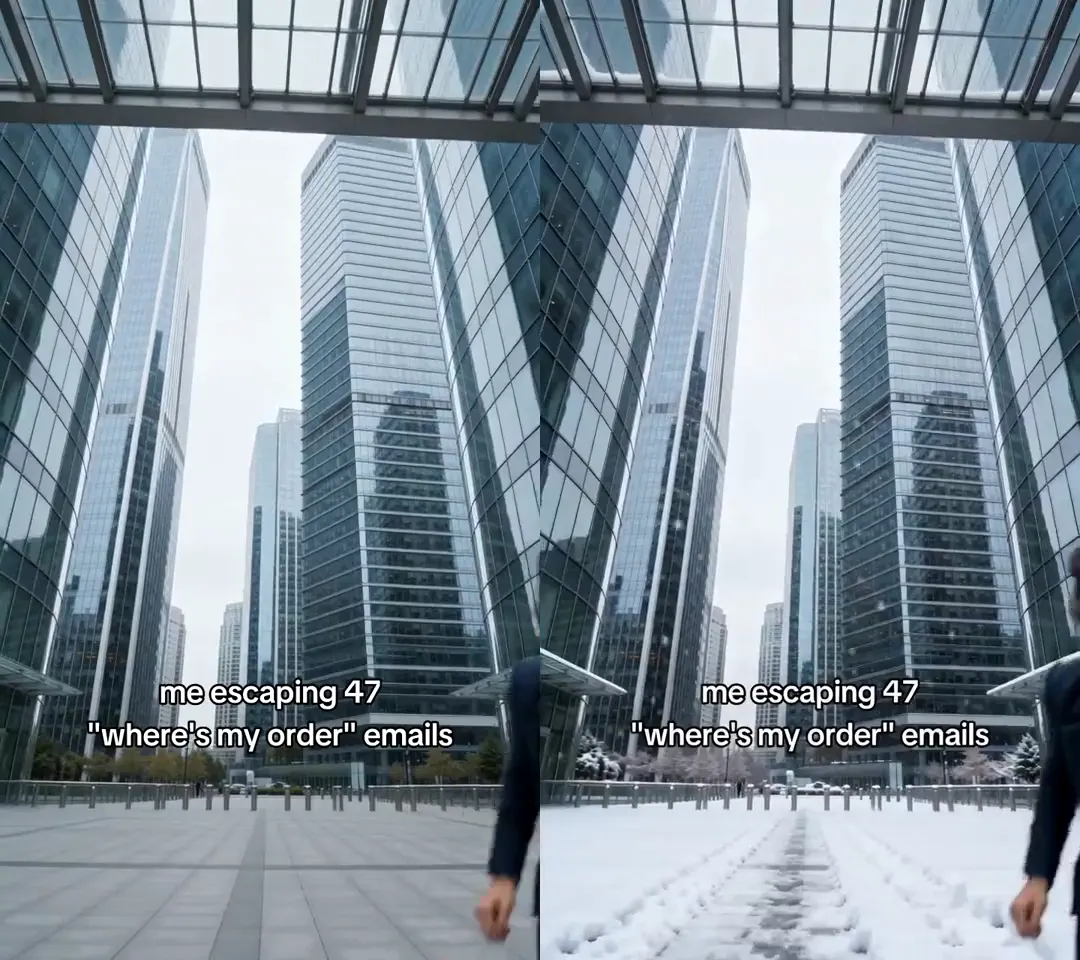
Click for the silent side-by-side: our own 5-second clip on the left, the snow version on the right. Seedance 2.0 at 720p, from a written brief alone.
Three ways to change the weather in a video
Most weather tools either sit on top of your clip or make a new one. Per each tool's own pages, checked November 16, 2026:
| Way | Example | What happens to your clip | Where it struggles |
|---|---|---|---|
| A weather overlay in an editor | Filmora's rain overlay, CapCut's snow overlays | Stays. Prebuilt drops or flakes play on a layer above it | The ground stays dry, the sky and light don't change |
| A generator | Kling's rain videos, made from a text prompt | Not used. You get a new rainy scene | Your person, moves, timing and sound aren't in it |
| A whole-clip re-render | Riffkit Swap | Drawn again from a written change, with the moves, framing and timing kept | Everything is redrawn, so details can drift, and in our tests the falling weather barely showed |
Runway's Aleph 2 also edits an existing clip from a prompt, up to 30 seconds, and its page gives "Change the season to winter" as an example.
Pick by what has to change. If you only need drops or flakes falling across the frame, an overlay is quick and exact. If the ground, the sky and the light should look like the weather changed, that takes a re-render. If you don't have a clip yet, a generator makes one.
Test 1: add snow to a video
The clip is 5 seconds, made with AI: a woman in a navy suit runs at a low camera across a paved plaza under a glass canopy, with a few quick jump cuts late in the clip, the caption 'me escaping 47 "where's my order" emails', music and no dialogue. We wrote this in "What to change" and nothing else:
Change only the weather: make it a snowy day. Snow falls steadily through the whole clip, soft flakes drifting past her and the camera. A layer of fresh white snow covers the ground of the plaza, the top of the glass canopy and the ledges of the towers, and the grey sky stays grey and a little brighter from the snow. Keep everything else exactly as it is: the same woman, her face, expressions, hair bun and the strands blowing loose, the navy suit and shirt, the thin gold chain, her run toward the camera and her fists, the glass canopy, the towers, the low camera angle, the framing, every cut, the timing, the sound, and the caption text and its position. Her clothes stay exactly the same, with no coat, no scarf and no gloves. Add nothing else: no Christmas decorations, no lights, no extra people, no new text.
It billed as 5 seconds, 600 credits, and took about 4 minutes.
| Brief | Result |
|---|---|
| Snow on the plaza | White from the first frame to the last, apart from a patchy strip down the middle |
| Snow on the canopy and ledges | On the canopy rims, but none shows on the tower ledges |
| Snow falling through the whole clip | Not as asked. A scatter of tiny flakes against the dark glass at the start, then almost nothing |
| Clothes stay the same | Same suit, no coat, but snow landed on her shoulders, lapels and hair |
| Keep everything else | Face, run, chain, towers, camera, framing, jump cuts and caption held. The sound is the original track |
She blocks most of the plaza within about a second, so after that the snow shows in the bottom corners, and it is still there at 2, 3 and 4.5 seconds. Two extras: tracks like footprints near the middle of the plaza, with nobody there to make them, and the snow on her shoulders, which fits the weather even though the brief didn't ask for it. This test first ran in our Christmas video tests, which add lights, a tree and pajamas to other clips.
Test 2: add rain to a video
Same clip, same engine and setting, a written brief only:
Change only the weather: make it a rainy day. Rain falls through the whole clip, thin bright streaks of rain coming down in front of the dark towers and past her. The ground of the plaza is soaking wet, with shallow puddles and clear reflections of her, the glass canopy and the towers in the wet paving, and raindrops splash in the puddles. The glass canopy is wet with drops running down it. The sky is heavier and darker grey, with soft, even light. Keep everything else exactly as it is: the same woman, her face, expressions, hair bun and the strands blowing loose, the navy suit and shirt, the thin gold chain, her run toward the camera and her fists, the glass canopy, the towers, the low camera angle, the framing, every cut, the timing, the sound, and the caption text and its position. She has no umbrella, no raincoat and no hood, and her clothes stay the same. Add nothing else: no extra people, no cars, no lights, no new text.
It billed as 5 seconds, 600 credits, and took about 4 and a half minutes. We checked it against the original every quarter second.
| Brief | Result |
|---|---|
| Wet plaza with reflections | For about 2 seconds. The paving turns to standing water that mirrors the towers and the canopy, then from about 2.25 seconds the ground in the corners is dry paving again |
| Raindrops splashing in puddles | Ripple rings in the water in the first half second |
| Rain falling through the clip | Not as asked. No streaks show against the dark glass, even zoomed in |
| Glass canopy wet with drops | No drops show |
| Heavier, darker sky | Thicker clouds at the start; later frames look like the original's pale sky |
| No umbrella or raincoat, clothes the same | Held. Her hair and suit stay dry |
| Keep everything else | Face, run, chain, towers, camera, framing, jump cuts and caption held. The sound is the original track. One extra: two buttons on a cuff around 3 seconds |
The rain half worked. The opening is the convincing part: wet stone, mirrored towers and rings spreading in a puddle. Then the ground dries while she runs, which a careful viewer will notice, and nothing shows the rain actually falling. With one run each, we can't tell why the snow held and the wet ground didn't.
What the two tests tell you
- Weather on the ground is what a re-render changes. Snow on the plaza held to the end; wet paving lasted about 2 seconds.
- Falling snow and rain barely showed in either run, though both briefs asked for them through the whole clip. For visible flakes or drops, an overlay is the reliable route; we haven't tried one on top of a re-render.
- Everything else held in both: the person, the moves, the cuts, the caption and the original sound.
- Small extras get through: snow on her shoulders, tracks in the snow, buttons on a cuff. Every brief said to add nothing else.
Changing the sky
Both briefs touched the sky. The snow brief asked it to stay grey, and it did. The rain brief asked for a heavier sky, and the clouds thickened at the start, then looked like the original's again. A re-render redraws the whole frame, so if you want only the sky replaced and every other pixel kept, a sky replacement tool fits better. For a change of time of day, see how we turned a day video into night.
A weather prompt you can reuse
Change only the weather: make it a [snowy / rainy] day. [What the ground looks like: covered in fresh white snow / soaking wet with puddles and reflections.] [The sky.] Keep everything else exactly as it is: [the person, their clothes, every move, the camera angle, the framing, every cut, the timing, the sound, and any caption and its position.] Their clothes stay the same, with [no coat / no umbrella]. Add nothing else: no extra people, no new text.
Describe the ground first. That's the part that changed in both tests. Rule out the gear people add for weather, such as coats, umbrellas and hoods: none appeared in either clip. Don't count on falling flakes or drops, and check the last second as carefully as the first, since the rain clip lost its wet ground halfway through.
If your clip has several shots
Both tests were one place with a few jump cuts, and the cuts held. Cuts between different places can be harder: when we turned a 12-shot clip from day to night, Seedance 2.0 changed only the first shot. If one shot matters most, cut it into its own clip and run it alone.
How to add snow or rain with Swap
- Add your clip in Swap, up to 45 seconds and 100 MB.
- Write the change in "What to change", using the prompt above.
- List what must stay: the person, the clothes, the moves, the camera, the timing, the sound and any caption.
- Say what to leave out: "no umbrella, no coat, no new text".
- Check the price, then select Riff it →.
- Watch every frame before you post. If a caption dropped, the free caption editor can add it back once the whole video is made, in Riffkit's caption style.
You can also run Swap from ChatGPT or Claude; how to make videos in ChatGPT and Claude has the setup.
What it costs, and how to start free
Swap bills per second of finished video, rounded up to whole seconds: on Seedance 2.0 that's 60 credits a second at 480p and 120 at 720p. Each of our 5-second tests cost 600 credits at 720p. You only pay for seconds that rendered. Plans start at $15 a month for 3,000 credits; at that price, a 600-credit test comes to about $3.
You can sign up free, with no card, and new accounts usually start with free credits. A free account can Swap on Seedance 2.0 Fast or Seedance 2.0 at 480p, and a clip under 8 seconds comes back whole, so our 5-second clip would cost 300 credits on Seedance 2.0 at 480p, or 250 on Seedance 2.0 Fast. Videos on a free account carry a small Riffkit watermark; any plan removes it from every video, earlier ones included.
Rights: weather versions of clips you own
Use footage you own or have the rights to: changing the weather doesn't change who holds the rights to the person's likeness, the footage or the music. A video that won on someone else's account still belongs to them; to riff its formula into your own story, use Adapt, which makes new footage (where the line sits).
Open Swap and try it on a clip of your own. To move the scene somewhere else entirely, see our background test.
FAQ
How do I add snow to a video with AI?
Render the clip again with the snow written out. In Riffkit's Swap mode, add the clip (up to 45 seconds and 100 MB), describe the snow on the ground and list what must stay, then render. In Riffkit's test on Seedance 2.0, on a 5-second AI-made clip of a woman running across a paved plaza, snow covered the ground from the first frame to the last, with the same person, moves, caption and sound. Snow also landed on her shoulders, and the falling snow the brief asked for barely showed, so for visible flakes an editor overlay is the quick route.
How do I add rain to a video with AI?
There are two ways. A rain overlay in an editor such as Filmora puts falling drops on a layer above your clip, but the ground stays dry and the light doesn't change. An AI re-render, such as Riffkit's Swap mode, draws the clip again with wet ground. In Riffkit's test on Seedance 2.0, on a 5-second AI-made clip of a plaza, the paving turned wet with reflections and ripples for about 2 seconds, then went back to dry, and no falling rain showed. Use an overlay for falling drops, and check every frame of a re-render.
Can AI change the weather in a video I already have?
Yes, by re-rendering the clip from a written change. Riffkit's Swap mode and Runway's Aleph 2 both edit an existing clip from a prompt. In Riffkit's two tests on Seedance 2.0, on the same 5-second clip, the change to the ground landed (snow held for the whole clip, wet paving for about 2 seconds), the falling snow and rain barely showed, and the person, the moves, the cuts, the caption and the original sound held.
Can AI add falling snow or rain to a video?
Barely, in Riffkit's two tests on Seedance 2.0. Both briefs asked for snow or rain falling through the whole clip, but the snow clip showed only a scatter of tiny flakes in its first seconds and the rain clip showed no streaks at all, even zoomed in. Overlays in editors such as CapCut and Filmora put prebuilt flakes or drops across the frame, so they are the reliable route for weather you can see falling. Riffkit hasn't tested an overlay on top of a re-render.
Can I add snow or rain to a video for free?
You can try it free. Sign up for Riffkit with no card; new accounts usually start with free credits. A free account can use Swap on Seedance 2.0 Fast or Seedance 2.0 at 480p, and a clip under 8 seconds comes back whole, so a 5-second clip costs 300 credits on Seedance 2.0 at 480p or 250 on Seedance 2.0 Fast. Free videos carry a small Riffkit watermark, which any plan removes.
Will my video keep its original sound?
In both of Riffkit's weather tests on Seedance 2.0, yes: the snow and rain versions came back with the clip's original track and the same timing. List the sound among what must stay in your brief, then listen to the result before you post.
Can AI change the sky in a video?
A re-render can, but it redraws the whole frame. In Riffkit's rain test on Seedance 2.0, the brief asked for a heavier sky; the clouds thickened at the start, then looked like the original's pale sky. In the snow test, the brief asked the grey sky to stay grey, and it did. If only the sky should change and every other pixel must stay, a sky replacement tool fits better.
Keep reading
Add an Object to a Video with AI (Real Test)
Add an object to a video with AI and keep the person, moves and sound. Our test put sunglasses and a plant into an 11-second clip, checked every half second.
Make a Christmas AI Video from a Clip You Already Have
Make a Christmas AI video from a clip you already have: four Seedance 2.0 tests with lights, a tree, pajamas and snow, the exact prompts, and what slipped.
Change the Person in a Video with AI (Real Test)
Change the person in a video with AI: eight tools compared, and our 11-second test where words changed her hair but not her face. Why a photo helps.