Change the Person in a Video with AI (Real Test)
To change the person in a video with AI, give the tool a photo of the new person. Whole-person tools such as Riffkit's Swap, Higgsfield Recast and Viggle Mix redraw your clip with someone new in it; a face swap such as Akool's changes only the face. Describing the new person in words is quicker, so we tested that too, on an 11-second clip of ours on Seedance 2.0 at 480p, with the new woman described only in words. Her hair changed to the one we described. Her face stayed the original woman's. Below: eight tools side by side, the test with the exact wording and the cost, what changed and what didn't, and the steps that give the model a new face to work from. Disclosure: we make Riffkit.
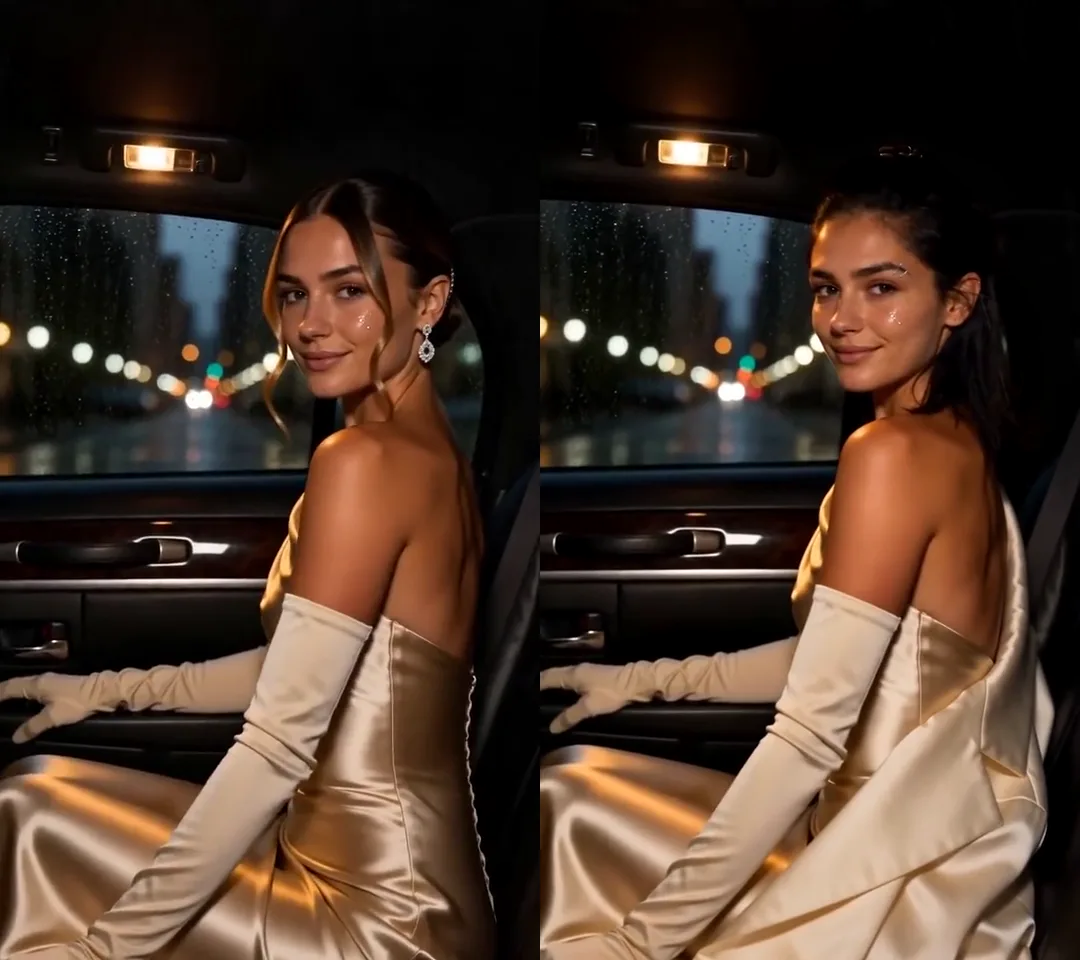
Click for the silent side-by-side: our own 12-second clip on the left, the same clip with a saved character in her place on the right, made from one photo. Seedance 2.5 at 720p, about 5 minutes to render.
Which AI tools change the person in a video?
They differ in how much of the person changes and what happens to the voice. Per each tool's own pages, checked November 5, 2026:
| Tool | What you give | What changes | The original voice | Clip length | Free to try / paid from |
|---|---|---|---|---|---|
| Higgsfield Recast | Your clip and one image of the new person | The whole person | Not stated on its Recast page | Not stated | Free daily credits, per its FAQ, though its app list tags it Pro; Starter $15 a month, billed yearly |
| Viggle Mix | Your clip or a template, and one photo (full body works best) | The whole person: face, body and clothes | Not stated | Up to 1 min free, 10 min on a plan | Free, watermarked; Pro $9.99 a month |
| Magic Hour Character Replace | Your clip and one image; a prompt on two of its three models | The whole character; its page warns background details can change | Not stated | Up to 60 s on the default model; plan limits apply | 3 free 3-second runs a day at 480p, may be watermarked; Creator $19 a month |
| Kling 4.0 video editing | Your clip, a prompt that includes "Edit @Video1", and optional reference images | What the prompt names; its guide says to add "Keep everything else unchanged" | No stated default; its guide's examples ask for the original audio in the prompt | 3 to 30 s | Free credits for selected features; Standard $6.99 the first month |
| Runway Edit Studio (Aleph 2.0) | Your clip; you edit one frame with a prompt and an optional reference image | What you change in that frame, carried through the clip | Not stated | 2 to 30 s, up to 10 cuts | Paid plans only; Standard $15 a month, 28 credits a second |
| Wan 2.2 Animate (open model) | A clip and one character image, on your own GPU | The whole person; its bundled mask tool handles single-person videos only | Not stated | No stated limit | Free under Apache 2.0; Alibaba Cloud's international region hosts it from $0.18 a second (2 to 30 s) |
| Akool Video Face Swap | A clip and the new face | Only the face | Not stated | 30 s free, 5 min on Starter | Free at 720p, watermarked; Starter $12 a month, billed yearly |
| Riffkit Swap | Your clip, plus a saved character (one photo) or a description in "What to change" | The whole clip, drawn again with the new person in it | Kept on Seedance 2.0; a new voice by default on Seedance 2.5 | Up to 45 s, 100 MB | Free credits at 480p (a clip that splits: the first section); plans from $15 a month |
A face swap such as Akool's changes only the face. The body and the outfit stay the clip's, so it suits a clip whose wardrobe already works. A whole-person tool takes the face, hair and build from your image, and some take the clothes too, so name the outfit you want kept. On sound, most pages say nothing; for developers, Pruna's P-Video-Replace on Replicate puts the source audio back by default, at $0.03 a second at 720p. If you want your own performance on a new character instead, Runway Act-Two and Kling Motion Control work that way round: the motion comes from your clip and is applied to the character in your image. Higgsfield's newer Genjutsu also recasts people in 4 to 30 second clips (how it compares).
The test: a new person, described in words, in one 11-second shot
The source is an 11-second vertical clip of ours (720x1280), made with AI, in one continuous shot with no cuts. A woman in a gaming headset rushes into a home office at the back of the room with a laundry basket, leans in close over the keyboard to unmute, fakes a laugh for her meeting, then backs away with a blank stare. She wears a rust-colored T-shirt and a black scrunchie on her wrist, and her dark hair is twisted up in a claw clip. The caption on screen reads "my only contribution to team meetings". She is one of our own AI characters.
The new person exists only in words: no saved character, no photo. That is the quickest way in, and one shot gives the model the easiest case: one render, no cuts, the same person near and far.
Settings: Swap, Seedance 2.0, 480p, no character, no reference images. We typed this into "What to change", word for word:
Only the person changes: she becomes a different woman, in her early forties, East Asian, with a straight black shoulder-length bob with a fringe, light natural makeup and a few fine lines at the eyes. It is the same new woman from the first frame to the last: when she rushes in at the back of the room, when she leans in close over the keyboard, and when she backs away. Keep everything else exactly as it is: the headset and its microphone, the rust-colored T-shirt, the black scrunchie on her wrist, the laundry basket and the clothes in it, the black keyboard with the orange backlight, the wooden desk, the room, the window blinds and the sunlight on the wall, the floor lamp, the grey armchair, the aquarium on the cabinet, her movements, gestures and expressions, the fake laugh and the blank stare after it, the camera angle, the framing, the timing, the original sound, and the caption text and its position. Add nothing else: no text, no products, no extra people.
What it cost: the clip runs 11.04 seconds, and a render bills whole seconds, rounded up, so 12 billed seconds x 60 credits, the Seedance 2.0 Swap rate at 480p: 720 credits, the same as the quote. It came back whole, in one render, about 8 minutes after we submitted.
What changed, and what didn't
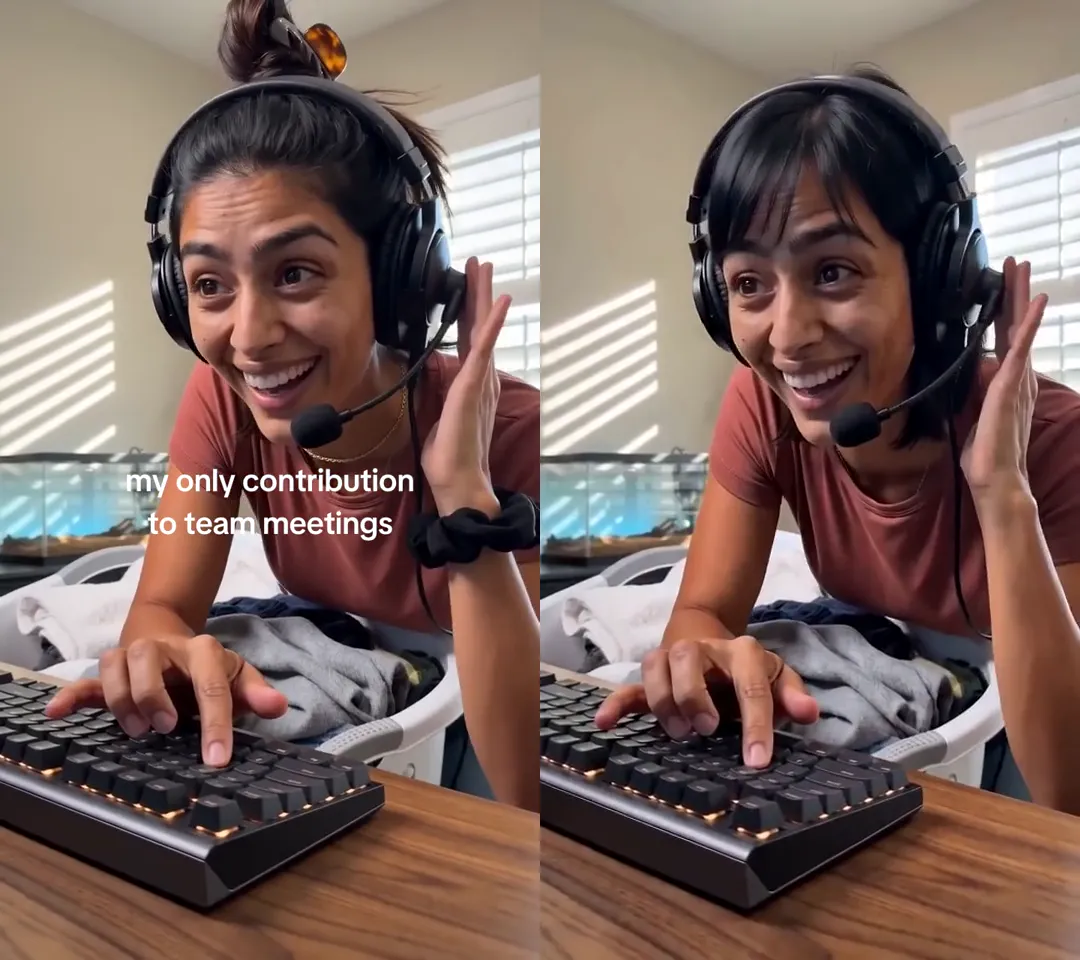
Click for the silent side-by-side: the original on the left, the Swap with the new woman described in words on the right. Seedance 2.0 at 480p, about 8 minutes to render.
We compared 23 pairs of frames, half a second apart, and the sound.
Her hair changed, and stayed changed. The claw-clipped bun became a straight black bob with a fringe, the same from the back of the room to the close-up and back again.
Her face stayed. Under the new fringe, the eyes, brows, nose and smile are the original woman's, in every frame we checked. She didn't come out in her early forties, or East Asian. The side-by-side above shows it best: the same laugh on the same face, with a new haircut.
Everything else we named held, with two exceptions:
| Kept | Lost |
|---|---|
| The headset and microphone, the T-shirt, the laundry basket and the clothes in it, the keyboard and its orange backlight, the desk, the blinds and the sunlight on the wall, the floor lamp, the armchair, the aquarium | The caption. "my only contribution to team meetings" is gone from every frame, though we named it |
| Her movements, the fake laugh and the blank stare, the camera angle, the framing and the timing, with no cut added | The scrunchie on her wrist |
One thing we didn't name went too: her thin gold necklace. Name every accessory you want kept, jewelry included, then check for it afterward: the scrunchie went even though we named it.
The sound is the original track, start to end, with no delay. On Seedance 2.0, Swap keeps the clip's voice.
One run, one clip, so take it as one result. It fits the Swap form's own advice: to change the person, pick a character. In our run, without one, the face didn't change at all.
What gives the model a new face: a character photo
Our reading of this one run: on Seedance 2.0, Swap leaned toward keeping the face already on screen, because the words didn't show it a new one. The haircut was the most concrete thing in our description, so that is what changed; "early forties, East Asian" wasn't enough to replace a face that is on screen for 11 seconds.
A sentence tells the model what the new person looks like; a photo shows it. When you pick a saved character, Swap sends the character's photo with your clip, so the model has a face to draw in place of the original one. In our 12-second test with a saved character, the side-by-side at the top of this page, on Seedance 2.5 at 720p, her face was in every shot, across a fire escape, a car and a red carpet. The one slip there was the outfit: on the fire escape she came out in the jacket from her character photo, because our line didn't name the clothes. So pick a character for the face, and name the outfit in "What to change".
The photo matters as much as picking one. The one that worked is a single image with two views of the same person: the face close up on the left, the whole body on the right. With an earlier single half-body photo of the same character, three runs didn't bring her face through.
A description still has its uses. In our run it changed the hair exactly as written, which is the whole job if a new haircut is what you want (how to change hair color in a video has more on that).
The voice: keep it, or give the new person their own
Seedance 2.0 and 2.0 Fast keep the original voice: the new person speaks with the voice from your clip, on the clip's own timing. That suits a clip whose words already work, like an ad read you want to run with a different face.
Seedance 2.5 is asked by default to give the new person a new AI voice on the lines spoken on camera, and MiniMax H3, on plans, works the same way. Where the engine turns down the new sound for a part, for example as a copyrighted recording, that part keeps your clip's own sound, so the new person may speak in the original voice there. Listen before you post. Narration, heard but not seen, keeps the original voice unless "What to change" asks for the new one in so many words, for example "the narration also in the new person's voice". To keep every voice on 2.5, write "Keep the original audio". A voice sample saved on a character comes in when you Adapt a video or create one from an idea; in Swap, the voice comes from your clip, or is made new on Seedance 2.5 and MiniMax H3.
| Engine | Swap rate, credits per second | Longest single render | The new person's voice |
|---|---|---|---|
| Seedance 2.0 Fast | 50 at 480p, 100 at 720p | 15 s | The original voice |
| Seedance 2.0 | 60 at 480p, 120 at 720p, 300 at 1080p | 15 s | The original voice |
| Seedance 2.5 | 90 at 480p, 180 at 720p | 30 s | A new voice by default, on lines spoken on camera |
A clip longer than one render is split into parts, on a shot cut where one is in reach, otherwise at a change of beat or at the render limit, up to 45 seconds per job, and the parts are joined back on the source's clock. Without a character photo, the face can differ from one part to the next. More on picking an engine: our Seedance character swap guide.
How to change the person in your video
- Save the new person as a character. In the web app, open Characters, select + New character, then add a name, pick a gender and an age range, and add one photo. The layout that works best is one image with two views of the same person on a plain background: the face close up on the left, front-facing and filling most of the panel, and the whole body on the right, head to toe. A natural photo tends to give more realistic video than a heavily retouched one. The photo goes through the video platform's review, usually in under a minute; when it reads Ready, it can render.
- Add your clip in Swap: an upload up to 100 MB or a TikTok link, up to 45 seconds. A finished Swap runs the full length of your clip, at its original speed.
- Pick the character. With no character and no new person described, the person in the clip stays. Each character you pick makes its own video, billed on its own.
- Pick the engine and resolution. The price, or an estimate for a new upload, shows before anything renders.
- Say what else must stay in "What to change": the outfit, jewelry, the props in their hands, any on-screen text. The camera, the cuts and the timing follow the source anyway. On Seedance 2.5, add "Keep the original audio" to keep the voice.
- Select Riff it →. On the Seedance engines, each part of the clip first passes the video platform's content review, which can take several minutes on a clip it hasn't seen before; a clip turned down there costs nothing. Before you post, check the face across the whole video, especially in profile and in motion. Video models miss now and then, so if it came back with the original face, check that the character photo is the two-view kind from step 1, then run it again.
If a caption comes back missing, as ours did, the free caption editor can add it back at no cost, in Riffkit's caption style rather than the original's, once the whole video is made. Add only lines that are gone; a line still in the picture would show twice. From Claude or ChatGPT instead of the web app, see replace the person in a video from a chat.
Can you change the person in a video for free?
Yes, to try it. You can sign up free, with no card, and new accounts usually start with free credits. A free account can save one character and Swap on Seedance 2.0 Fast or Seedance 2.0 at 480p, the setting we tested. A clip under 8 seconds comes back whole. A longer one comes back as its first section when it splits into parts, at a cut or a change of beat, and a plan finishes the rest at the same engine and resolution; one that doesn't split comes back whole. Our 11-second clip splits at a change of beat at about 5 seconds, so on a free account its first section is quoted at 360 credits on Seedance 2.0 at 480p. Videos on a free account carry a small Riffkit watermark; any plan removes it from every video, earlier ones included.
Swap bills per second, each render rounded up to whole seconds (at least 4). Failed renders aren't charged; if a run fails or is cancelled partway, only the seconds already rendered are billed. Plans start at $15 a month for 3,000 credits, less when billed yearly. At that price, this test's 720 credits come to about $3.60.
Rights: whose face and whose video
Put in a face you have the right to use: your own, a model's or creator's with their written permission, or an AI character you made, and no one under 18, real or AI. On Seedance 2.0 the clip's voice stays, so you need the permission of the person whose voice it is, too. Swap keeps the clip's music, and its voices wherever no voice changes, so swap footage you own or have the rights to. A video that won on someone else's account still belongs to them; to make your own version of it, use Adapt, which keeps the formula and makes new footage. Adapt lays the source's music under it by default, so check you can use that track, or change it (where the line sits).
Open Swap, pick a character and try it on a clip of your own. To change only the clothes and keep the person, see our outfit test; only the place, how to change a video's background.
FAQ
How do I change the person in a video with AI?
Use a tool that redraws your clip with a new person in it, and give it a photo of that person. In Riffkit's Swap mode, add the clip (up to 45 seconds), pick a saved character made from one photo, pick the engine and resolution, and say in "What to change" what else must stay, such as the outfit, props and on-screen text; the camera, cuts and timing follow the source anyway. In Riffkit's November 5, 2026 test on Seedance 2.0 at 480p, a new woman described only in words got the new haircut but kept the original face, for 720 credits.
Can I change the person in a video with AI for free?
Yes, to try it. Riffkit accounts sign up free with no card, usually with free credits, and can save one character and Swap on Seedance 2.0 Fast or Seedance 2.0 at 480p. A clip under 8 seconds, or one with no cut or clear beat change, comes back whole; otherwise it comes back as its first section, and a plan finishes the rest. Videos on a free account carry a small Riffkit watermark. Per their own pages on November 5, 2026, Viggle has a free plan with a watermark, Magic Hour gives 3 free 3-second runs a day at 480p, Akool's face swap is free at 720p with a watermark, and Wan 2.2 Animate is an open model you can run on your own GPU.
Does the new person keep the original voice?
On Riffkit's Seedance 2.0 and 2.0 Fast Swap, yes: the new person speaks with the voice from your clip, on the clip's own timing, and in Riffkit's 11-second test the sound came back as the original track. On Seedance 2.5 and MiniMax H3, the engine is asked by default to give the new person a new AI voice on lines spoken on camera, so listen before you post; write "Keep the original audio" to keep every voice. Most other tools' pages don't say what happens to the sound.
What's the difference between a face swap and changing the whole person?
A face swap, such as Akool's, changes only the face; the body and the outfit stay the clip's. A whole-person tool, such as Riffkit's Swap, Higgsfield Recast or Viggle Mix, takes the face, hair and build from your image, and some take the clothes too, so name the outfit you want kept.
Do I need a photo of the new person?
For a new face, use one. In Riffkit's test on Seedance 2.0, a new woman described only in words got the haircut from the description, but her face stayed the original woman's in every frame checked. Riffkit's Swap form says to pick a character to change the person. With a saved character, the character's photo goes with the clip, and in Riffkit's 12-second test on Seedance 2.5 the new face held in every shot; the photo that worked is one image with the face close up on the left and the whole body on the right. Save the person once as a character with one photo, then pick that character for each video.
How long can the video be?
Riffkit's Swap takes clips up to 45 seconds and 100 MB. It renders up to 15 seconds at a time on Seedance 2.0 and 2.0 Fast (30 on Seedance 2.5), splits a longer clip on a shot cut where it can, otherwise at a change of beat or at the render limit, and joins the parts back on the source's clock; without a character photo, the face can differ from one part to the next. Per their own pages on November 5, 2026, Viggle Mix takes up to 1 minute free and 10 minutes on a plan, Kling 4.0 video editing 3 to 30 seconds, Runway Edit Studio 2 to 30 seconds, and Akool's face swap 30 seconds free.
Is it legal to change the person in a video?
It depends on whose face, whose voice and whose footage. Use a face you have the right to use: your own, a model's or creator's with their written permission, or an AI character you made, and no one under 18, real or AI. On Riffkit's Seedance 2.0 Swap the clip's voice stays, so you need that person's permission too. Swap keeps the clip's music, and its voices wherever no voice changes, so swap footage you own or have the rights to. To make your own version of someone else's winning video, use Adapt, which keeps the formula and makes new footage; it lays the source's music under it by default, so check you can use that track.
Keep reading
Add an Object to a Video with AI (Real Test)
Add an object to a video with AI and keep the person, moves and sound. Our test put sunglasses and a plant into an 11-second clip, checked every half second.
Make a Christmas AI Video from a Clip You Already Have
Make a Christmas AI video from a clip you already have: four Seedance 2.0 tests with lights, a tree, pajamas and snow, the exact prompts, and what slipped.
Replace an Object in a Video with AI (Real Test)
Replace an object in a video with AI and keep the person, room, camera and sound. Our keyboard test, checked every half second, plus the tools and the cost.