Change Outfit in Video with AI: New Clothes, Same Shots and Cuts
You can change the outfit in a video with AI and keep every shot, cut and pose. Here is how with Riffkit's Swap mode, from a real test: three outfits in one 12-second clip, the exact brief, the cost and what drifted. A disclosure first: we make Riffkit.
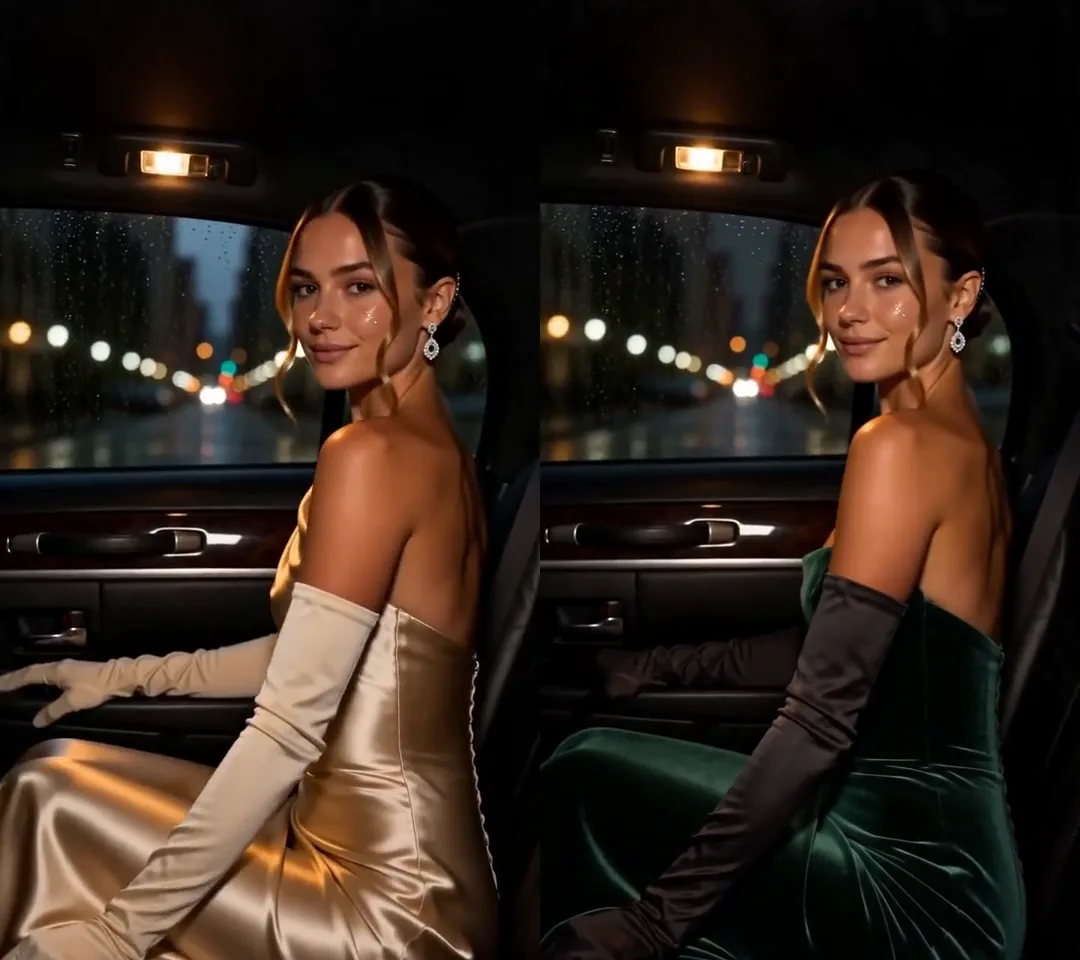
Click for the silent side-by-side: the original on the left, the Swap on the right. Seedance 2.5, 720p, 12 seconds, 2,340 credits, about 6 minutes to render.
How an AI outfit change works
Swap renders the whole video again on the source's own clock. The shots, cuts, camera moves, poses and timing stay where the original has them, and the clothes you name change. That is why the new clothes look worn. It is also why small details can drift, so check the result before you post.
Higgsfield's Video to Video page lists an AI Outfit Swap that changes the color, cut and fabric of the clothes in your clip, using Kling 3.0 Omni Edit or FLUX 3 Video Edit. It says the person keeps their poses and pacing while the new clothes blend with the light and shadows. In Riffkit Swap, you write the outfit change as a brief, for clips up to 45 seconds.
The test: three outfits in one Swap
The source is our own 12-second red-carpet clip (720x1280), made with AI and saved as a template in our account. It moves from a fire escape to a car to a red carpet, with a different look in each, under the caption "can't tonight, way too much going on". We typed this into "What to change", word for word:
Change her outfits and keep her the same woman: on the fire escape, the grey sweatshirt becomes an oversized cream cable-knit sweater; in the car and on the red carpet, the gold satin gown with long gloves becomes a deep emerald velvet gown with long black satin gloves, and the long cream coat becomes a long black tailored coat. Keep her face, hair, every shot, cut, camera move and pose. Keep the on-screen caption text exactly as it is.
We ran it as one job on Seedance 2.5 at 720p. It took about 6 minutes and cost 2,340 credits. The source runs 12.04 seconds and each render bills whole seconds, rounded up, so that is 13 billed seconds x 180 credits, the Seedance 2.5 Swap rate at 720p.
| Scene | Original | Brief | Result |
|---|---|---|---|
| Fire escape | Grey off-shoulder sweatshirt, phone tucked on her shoulder | Oversized cream cable-knit sweater | Cream cable-knit sweater; she now holds the phone to her ear with her hand |
| Car | Gold satin strapless gown, long cream gloves | Deep emerald velvet gown, long black satin gloves | Emerald velvet gown, long black gloves |
| Red carpet | Gold gown, long cream coat | Emerald gown, long black tailored coat | Long black coat over the emerald gown; her shoes turned black |
All three outfits changed as written. Shots, cuts, poses, camera moves and timing line up with the original. Her face, hair and earrings stayed, and so did the car, the chandeliers, the gold columns, the petals and the caption.
Two details drifted: the phone moved from her shoulder to her hand, and her shoes turned black, which the brief didn't ask for.
How to change an outfit in a video with Swap
-
Open Swap. It's the first card on the Make videos page.
-
Add the clip. Upload a file up to 100 MB, paste a TikTok link or pick a template. Swap keeps the full length, up to 45 seconds, so trim a longer clip first.
-
Write the change in "What to change". Name each look and the scene it's in. To change only the opening look, tap New outfit under the box to add this sentence, then edit it:
Change the opening outfit to a fresh, put-together look: a white tee under an open light-blue denim shirt, beige straight-leg trousers and clean white sneakers.
A video with an outfit change keeps its later looks unless you name them too.
-
Optionally, change who wears it. With no character picked, the original person stays. Pick a saved character to replace her, keep the outfit lines in "What to change" and take her face out of the keep-line. Our Seedance character swap guide shows how to set one up.
-
Pick an engine. A paid Swap defaults to Seedance 2.5 at 720p, the settings we used. Free accounts can Swap on Seedance 2.0 Fast 480p, Seedance 2.0 480p or MiniMax H3 768P.
-
Check the price and submit. The page shows each engine's rate per second, then the billed seconds and credit total, before you tap Riff it →.
How to write an outfit brief
- Name each look and where it appears. "On the fire escape" and "in the car and on the red carpet" tell the model which outfit goes where.
- Give each piece a color, a fabric and a cut. "Deep emerald velvet gown" and "oversized cream cable-knit sweater" leave little to guess. Name the accessories you want too, like "long black satin gloves".
- End with a keep-line. Ours listed her face, hair, shots, cuts, camera moves, poses and the caption. Her face, hair, cuts and caption all held.
- Expect unnamed pieces to follow the new look. Her shoes turned black with no word about shoes in the brief. If shoes, a bag or the way she holds a prop matter, name them. Next time we'd add the phone on her shoulder to the keep-line.
More on this: write what changes, not a prompt.
What it costs, and how to start free
Swap bills per second of finished video, at its own rates:
| Engine | Swap credits per second |
|---|---|
| Seedance 2.0 Fast | 50 at 480p, 100 at 720p |
| Seedance 2.0 | 60 at 480p, 120 at 720p, 300 at 1080p |
| Seedance 2.5 | 90 at 480p, 180 at 720p |
| MiniMax H3 | 80 at 768P, 160 at 2K |
Each render bills whole seconds, rounded up. Failed renders aren't charged, and if a run fails partway, only the seconds already rendered are billed. Seedance 2.5 at 480p is half its 720p rate, so a 480p draft lets you check a brief before the final. Plans start at $15 a month for 3,000 credits.
New accounts start with free credits, no card needed, and can Swap on Seedance 2.0 Fast 480p, Seedance 2.0 480p or MiniMax H3 768P. A short clip comes back whole; most longer ones start with a free first section, and a plan finishes the rest. Seedance 2.5, 720p and above, and H3 at 2K come with a plan. Riffkit adds no watermark on any plan. So far we've run this outfit brief on Seedance 2.5 only.
Rights: use footage you own
The red-carpet footage is ours; we made it with AI. Its soundtrack is the original TikTok's music, and Swap keeps the source's music, so this comparison is silent. Use your own footage or footage you have the rights to. The people and music in someone else's TikTok still belong to them, new clothes or not. For someone else's winner, Adapt, Riffkit's other mode, keeps the formula and makes new footage. Adapt keeps the source's music by default, so pick "Reference original BGM" for an original track in that style.
Try it on your own clip
Open Swap, add a clip of your own up to 45 seconds, tap New outfit or name each look, and submit. For a whole new look, the same clip restyled as 90s anime is in our video to anime guide.
FAQ
How do I change an outfit in a video with AI?
In Riffkit's Swap mode, add the clip (an upload up to 100 MB, a TikTok link or a template, up to 45 seconds) and write the new clothes in the "What to change" box. Name each look, the scene it appears in, and its color, fabric and cut, or tap the one-tap "New outfit" suggestion to change the opening look. Then pick an engine, check the credit total and submit. Swap renders the whole video again with the same shots, cuts, camera moves, poses and timing, so the new clothes look worn, and small details can drift. With no character picked, the original person stays.
Is there a free AI outfit changer for video?
You can try Riffkit's Swap mode free, with no card needed. New accounts start with free credits and can Swap on Seedance 2.0 Fast 480p, Seedance 2.0 480p or MiniMax H3 768P. A short clip comes back whole, and most longer ones start with a free first section that a plan finishes. Riffkit adds no watermark on any plan. Riffkit's own outfit test ran on Seedance 2.5 at 720p, which comes with a plan; plans start at $15 a month for 3,000 credits.
Can AI change clothes in a video and keep the same person?
Yes. In Riffkit's Swap mode, the original person stays unless you pick a saved character or describe someone new. In Riffkit's 12-second test on Seedance 2.5 at 720p, three outfits changed as written, her face, hair and earrings stayed, and the shots, cuts, poses, camera moves and timing lined up with the original. Two details drifted: she held a phone to her ear with her hand instead of tucking it on her shoulder, and her shoes turned black without being asked. Ending the brief with a keep-line, such as "Keep her face, hair, every shot, cut, camera move and pose", says what must stay.
How much does it cost to change an outfit in a video with AI?
Riffkit bills Swap per second of finished video. Swap rates in credits per second: Seedance 2.0 Fast, 50 at 480p and 100 at 720p; Seedance 2.0, 60 at 480p, 120 at 720p and 300 at 1080p; Seedance 2.5, 90 at 480p and 180 at 720p; MiniMax H3, 80 at 768P and 160 at 2K. Each render bills whole seconds, rounded up, so Riffkit's 12.04-second outfit test on Seedance 2.5 at 720p billed 13 seconds, or 2,340 credits. Failed renders aren't charged. Plans start at $15 a month for 3,000 credits.
Can I change multiple outfits in one video with AI?
Yes, by naming each one. Riffkit's Swap mode takes a written brief in the "What to change" box, so list every look with the scene it appears in, for example "on the fire escape, the grey sweatshirt becomes an oversized cream cable-knit sweater". Riffkit changed three outfits across three scenes in one 12-second Swap this way, on Seedance 2.5 at 720p. The one-tap "New outfit" suggestion changes the opening outfit only, so a video with an outfit change keeps its later looks unless you name them too.
What is Higgsfield AI Outfit Swap?
AI Outfit Swap is listed on Higgsfield's Video to Video page, as of October 6, 2026. It changes the color, cut and fabric of the clothes on the person in a clip, using Kling 3.0 Omni Edit or FLUX 3 Video Edit. Higgsfield says the person keeps their poses and pacing while the new clothes blend with the light and shadows. Riffkit's Swap mode makes an outfit change from a written brief: you describe the new clothes, and it renders the whole video again with the source's shots, cuts and timing, for clips up to 45 seconds.
Keep reading
Kling Motion Control Alternative: Same Shots and Cuts, Your Character
Looking for a Kling Motion Control alternative? What Kling does well as of October 2026, and when keeping a whole video's shots and cuts fits better.
Seedance Character Swap: Replace a Character, Keep Every Shot
How to do a Seedance character swap: set up a character from one photo, then reshoot a clip with the same shots and cuts. Steps, engines and rates.
Video to Anime Converter: Turn a Real Video into Anime, Same Shots and Cuts
Turn a real video into anime or a cartoon look and keep its shots, cuts and timing. The exact brief we used, a silent before and after, per-second costs and what didn't work.