Video to Anime Converter: Turn a Real Video into Anime, Same Shots and Cuts
"Video to anime" can mean two things. One is a look: upload a clip, pick a style, get a stylized version back. The other is the same video redrawn shot for shot, with every cut, pose and camera move where the original had it. This guide covers the second one, using Riffkit's Swap mode. It has the steps, the exact brief we used, a silent before and after, the costs and what didn't come out right.
A disclosure first: we make Riffkit, and the sample below came out of its Swap mode.
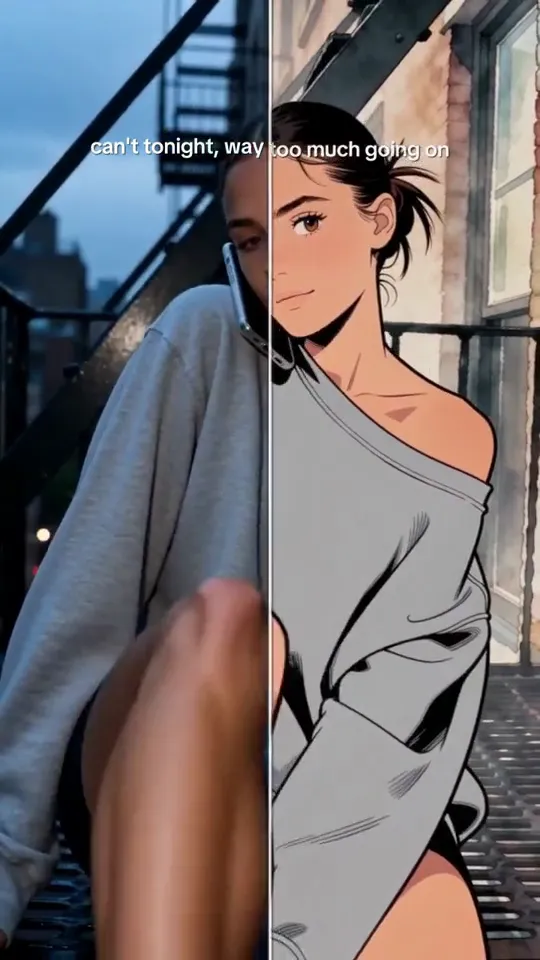
Click for the silent comparison: a divider line sweeps between the original and the Swap. Seedance 2.5, 720p, 12 seconds, 2,160 credits, about ten minutes to render.
The original is a video we made ourselves with Riffkit's Adapt mode. It moves through a fire escape, city lights, a car interior and a red carpet with chandeliers and gold columns, and the woman changes from a grey sweatshirt into a gold satin gown. The soundtrack is the original TikTok's music, which Adapt keeps by default. That isn't ours to publish, so the comparison in this post is silent.
Converter, style menu or reshoot?
Search "video to anime converter" and the first page is mostly tool pages from VEED, Luma, Pollo AI, Media.io, Wink and others. Their landing pages describe a similar flow: upload, pick a style, download. On September 30, Higgsfield's Genjutsu added Restyle, a menu of 20+ animated styles, for reference videos of 4 to 30 seconds per generation. For a look on a short clip, picking from a menu is quicker than writing a description.
Riffkit Swap is built for a narrower job: the edit already works, and you want that exact edit back in a new look. You describe the look in words or tap one suggestion. Swap then reshoots your video on the source's own clock, up to 45 seconds in one job, at full length. So here, "AI video style transfer" or "video to video AI" means a whole video goes in and the same structure comes out. Our Genjutsu comparison puts the two side by side.
How to turn a video into anime with Riffkit Swap
-
Pick Swap. Open Riffkit and choose Swap under "How to riff it".
-
Add the clip. Upload a file (up to 100 MB), paste a TikTok link or pick a template. Swap keeps the full length, up to 45 seconds, so trim a longer clip first. To restyle a video you made in Riffkit, download it and upload it again, which is what we did here.
-
Write the look, or tap "Anime look". Write the look in the "What to change" box, or tap the "Anime look" suggestion under it to add this sentence, which you can edit:
Turn the whole video into 90s hand-drawn cel animation: flat cel-shaded colors with hard-edged shadows, bold even ink outlines, hand-painted watercolor backgrounds and a warm late-afternoon palette.
-
Pick an engine. Free accounts can Swap on Seedance 2.0 Fast 480p, Seedance 2.0 480p or MiniMax H3 768P. On a paid plan, Swap defaults to Seedance 2.5 at 720p. That look has rendered on Seedance 2.0 Fast at 480p, MiniMax H3 at 768P and Seedance 2.5 at 720p.
-
Tap "Riff it →". Each engine's per-second rate shows before anything renders. On the Seedance engines, the clip goes through the video platform's content review before the first paid render, and a rejected source costs nothing.
The exact brief behind the red carpet
The one-tap sentence sets the look. For the red carpet we wrote a longer brief that also pins down the person, her outfits, every setting and the caption. Word for word:
Turn the whole video into 1990s hand-drawn cel animation: flat cel-shaded colors with hard-edged shadows, bold even ink outlines, hand-painted backgrounds with soft watercolor texture, light film grain and a warm evening palette. The same woman stays the star in every shot, drawn as an anime heroine with large expressive eyes, sleek dark hair pulled back, and the same outfits: the grey sweatshirt on the fire escape, then the gold satin gown with long gloves and the long cream coat. The fire escape, the city lights, the car interior, the chandeliers, the gold columns and the red carpet are all redrawn in the same anime style. Keep the on-screen caption text exactly as it is.
Four habits from it are worth reusing:
- Describe features, not a label. Colors, lines, shadows, textures and a palette give the model more to work with than "anime" or a studio name.
- Keep the person in the brief. With no character picked, the original person stays. Describing her look and each outfit tells the model who to redraw in every shot.
- List the settings. Name each place you want redrawn, not just "the background".
- Say which text stays. We asked to keep the on-screen caption exactly as it is, and it survived.
What stays and what changes
Swap keeps the shots, cuts, camera moves, poses, timing and framing. It also keeps the full length, the aspect ratio and the music. In the red-carpet test they line up with the original, and the sweeping line in the comparison lets you check.
What changes is what you name. "The whole video" covers people, clothes and settings alike, but how fully that lands varies (see the next section).
Voices depend on the engine. On Seedance 2.0 and 2.0 Fast, the original voice stays. On Seedance 2.5 and MiniMax H3, a replaced person's on-camera lines get a new AI voice. Narration keeps the original voice unless your text asks for a change. If a voice matters, listen before you post.
What didn't come out perfect
The fire escape and car shots came out fully anime. On the red carpet, the woman is drawn, but the chandeliers and gold columns stayed semi-realistic, even though the brief named both. Busy backgrounds full of lights are the first place we'd check before posting.
Other cartoon looks go in the same box and are described the same way; anime is the look we've rendered on three engines. On STORM II, by GENER8ION (Surkin and Romain Gavras), starring Yung Lean, with choreography by Damien Jalet, a claymation try kept a hand gesture from the original that we wanted gone, so we went with anime. The footage and the song are theirs, and we share our anime version only as a YouTube link. On a longer clip, render the first section, check it, then finish from the same script.
What it costs
Billing is per second of finished video. A Swap carries the source into every render, so it has its own rates, in credits per second:
| Engine | 480p | 720p | Higher |
|---|---|---|---|
| Seedance 2.0 Fast | 50 | 100 | – |
| Seedance 2.0 | 60 | 120 | 300 (1080p) |
| Seedance 2.5 | 90 | 180 | – |
| MiniMax H3 | 80 (768P) | – | 160 (2K) |
The red carpet was 12 seconds on Seedance 2.5 at 720p: 12 x 180 = 2,160 credits. Our 30-second STORM II anime version on the same settings was one job at 5,400 credits. Seedance 2.5 at 480p costs half the 720p rate, so a 480p draft is a cheaper way to test a brief before the final.
Each render is billed in whole seconds, rounded up. Failed renders aren't charged, and if a run fails partway, you pay only for the seconds already rendered. New accounts start with free credits and no card. Seedance 2.5, 720p and above, and H3 at 2K need a plan. Pricing starts at $15 a month for 3,000 credits.
Already have an ad that works? Make an anime version
Swap starts from the ad you already have, so this tests a new look on an edit you've already proven: the same hook, cuts and timing, redrawn. That keeps the look as the main thing that changes between the two versions. Check the product on screen too, since "the whole video" redraws it as well.
Motion's 2026 creative benchmarks, built on $1.29B of Meta spend across 578,750 creatives from September 2025 to January 2026, rank "Animation" second-worst of 15 asset types by hit rate. The spend leaders are offer banners, product demos and testimonials. Motion doesn't define what counts as animation. Kantar found that Coca-Cola's 2025 AI ad with animated animals scored stronger on most emotional metrics than its 2024 ad with AI humans. It also found that ads where the AI is obvious brand worse. An anime version is a way to test a different look on a video that already works, not a proven better ad format. Run it next to the original and let your own numbers decide.
For a new ad with your product, use Adapt, Riffkit's other mode: pick a winning video or a template, add your product with photos, and ask for an anime look, which we've tested once, on Seedance 2.5. The product on screen gets redrawn in the style too, so treat the result as an ad creative, not as a picture of your product for a listing. Adapt keeps the winner's music by default; if the winner is someone else's, pick "Reference original BGM" for an original track in that style.
Rights: start with footage you own
Use your own footage, or footage you have the rights to. A restyle changes how a video looks, not who owns it. Swap also keeps the source's music, so any track in the original carries over, which is why our comparison has no audio track. If you post something similar, post it silent or add music from the platform's own library.
Swap accepts TikTok links, but the people and the music in someone else's TikTok still belong to them, anime or not. Don't restyle another creator's video for an ad or a shop. When the winning video is someone else's, use Adapt, which keeps the formula and replaces the footage. Adapt keeps the source's music by default ("Use original BGM"); "Reference original BGM" composes an original track in that style instead.
Our two STORM II versions, the anime one and a grandma choir, are the third-party restyles we share, and only as credited YouTube links. Crediting the creators and keeping them non-commercial doesn't give us any rights to their footage or song: YouTube flagged our uploads as claimed content, and the claims go to the rights holder. Our STORM II how-to has the brief behind the grandma choir.
Try it on your own clip
Open Swap, add a clip of your own up to 45 seconds, tap "Anime look" or write your own look, and submit on a free engine. Prefer a chat? Add Riffkit's connector to Claude or ChatGPT and ask for the same Swap.
FAQ
How do I turn a real video into anime with AI?
In Riffkit's Swap mode you add the clip (an upload of up to 100 MB, a TikTok link or a template, up to 45 seconds), then describe the new look in the "What to change" box or tap the one-tap "Anime look" suggestion. Then pick an engine and submit. Swap keeps the shots, cuts, camera moves, poses, timing and framing and redraws what you describe. Describe the look by its features, such as flat cel-shaded colors, bold ink outlines and watercolor backgrounds, rather than a studio name.
Is there a free video to anime converter?
You can try Riffkit's Swap mode free, with no credit card. New accounts start with free credits and can Swap on Seedance 2.0 Fast 480p, Seedance 2.0 480p or MiniMax H3 768P. The look behind the one-tap "Anime look" sentence has rendered on Seedance 2.0 Fast 480p and MiniMax H3 768P, both of which a free account can use. A short clip comes back whole, and most longer ones start with a free first section that a paid plan finishes. Riffkit adds no watermark on any plan.
Does AI video style transfer keep the original cuts and timing?
That depends on the tool. Riffkit's Swap mode reshoots the source on its own clock, so the shots, cuts, camera moves, poses, timing, framing and music stay, and so does the full length (sources up to 45 seconds). In Riffkit's 12-second red-carpet test on Seedance 2.5 at 720p, the anime version's shots, poses, cuts and timing lined up with the original. The on-screen caption also survived; the brief had asked to keep it exactly as it was.
How much does it cost to turn a video into anime?
Riffkit bills Swap per second of finished video. The per-second rates are: Seedance 2.0 Fast, 50 credits at 480p and 100 at 720p. Seedance 2.0, 60, 120 and 300 (480p, 720p, 1080p). Seedance 2.5, 90 at 480p and 180 at 720p. MiniMax H3, 80 at 768P and 160 at 2K. A 12-second anime Swap on Seedance 2.5 at 720p cost 2,160 credits. Failed renders aren't charged, and plans start at $15 a month for 3,000 credits.
How long can a video be for AI video to anime?
Riffkit's Swap mode takes a source of up to 45 seconds in one job and keeps its full length, and uploads can be up to 100 MB. A longer source is turned away rather than trimmed, so cut it down first. You can also make a clip in sections: render the first one, check it, then finish from the same script. For comparison, Higgsfield's Genjutsu takes reference videos of 4 to 30 seconds per generation.
Can AI make an anime ad from a product photo?
Riffkit makes it from your product plus a video that already works. In its Adapt mode you pick a winning video or a template, add your product with photos, and ask for an anime look; Riffkit has tested Adapt's anime look once, on Seedance 2.5. The product on screen is redrawn in the same style, so treat the result as an ad creative, not an accurate product image. Adapt keeps the source video's music by default ("Use original BGM"); if the winning video is someone else's, choose "Reference original BGM" for an original track in that style. To redraw an ad you already have, Riffkit's Swap mode keeps its hook, cuts and timing.
Do animated ads perform better than live action?
There's no proof that they do. Motion's 2026 creative benchmarks ($1.29B of Meta spend, 578,750 creatives, September 2025 to January 2026) rank "Animation" second-worst of 15 asset types by hit rate. Motion doesn't define animation, and its spend leaders are offer banners, product demos and testimonials. Kantar found that Coca-Cola's 2025 AI ad with animated animals scored stronger on most emotional metrics than its 2024 ad with AI humans, and that ads where the AI is obvious brand worse. The safe way to use an anime version is as a test of a new look on an ad that already works.
Can I turn someone else's TikTok into anime and post it?
A restyle changes how a video looks, not who owns it. Riffkit's Swap mode keeps the source's music, and the people and footage in someone else's TikTok still belong to them, anime or not. So use your own footage or footage you have the rights to, and don't restyle another creator's video for an ad or a shop. Crediting the creators and keeping it non-commercial doesn't give you the rights; when Riffkit shared a credited, non-commercial restyle on YouTube, it was flagged as claimed content and the claim went to the rights holder. When the winning video belongs to someone else, Riffkit's Adapt mode keeps the formula and replaces the footage with new footage. Adapt keeps the source's music by default ("Use original BGM"), so choose "Reference original BGM" to get an original track in that style instead.
Keep reading
How to Create an AI Influencer and Make AI Influencer Videos, Step by Step
How to create an AI influencer and make AI influencer videos in three steps: one real-looking face image, a Riffkit character, then formats already winning.
Formula Breakdown: The POV Sprint Series
A 5-second single take, no cuts, no dialogue: low camera, sprint at the lens, one static POV line. The analysis card, and how to run it as a daily series.
Meta Andromeda and Creative Diversity: What Counts as a New Ad
What Meta's Andromeda changed for creative, why similar ads get grouped, what counts as a genuinely different ad, and how to make real versions of a winner.