Replace the Car in a Video with Your Own Car (Real AI Test)
To replace the car in a video with your own car, use an AI video-to-video editor that takes photos of your car and re-renders the clip you already have. We tested Riffkit's Swap on November 1, 2026, with a 10-second car edit of a red sports coupe on a coastal road and one photo of a matte green SUV. The cuts, camera moves, speed, road, light and music all held, and the front shot looks like the SUV in the photo. The wheel close-up kept the coupe's wheel and turned the body white or silver, and the engine invented the rear, a real brand's badge included, because our photo showed only the front. Give one photo for each angle your clip shows. It cost 1,980 credits on Seedance 2.5 at 720p and took about 6 minutes. The clip and the SUV photo are stand-ins we generated with AI: we can't use someone else's car edit, and we don't own a green SUV. Disclosure: we make Riffkit.
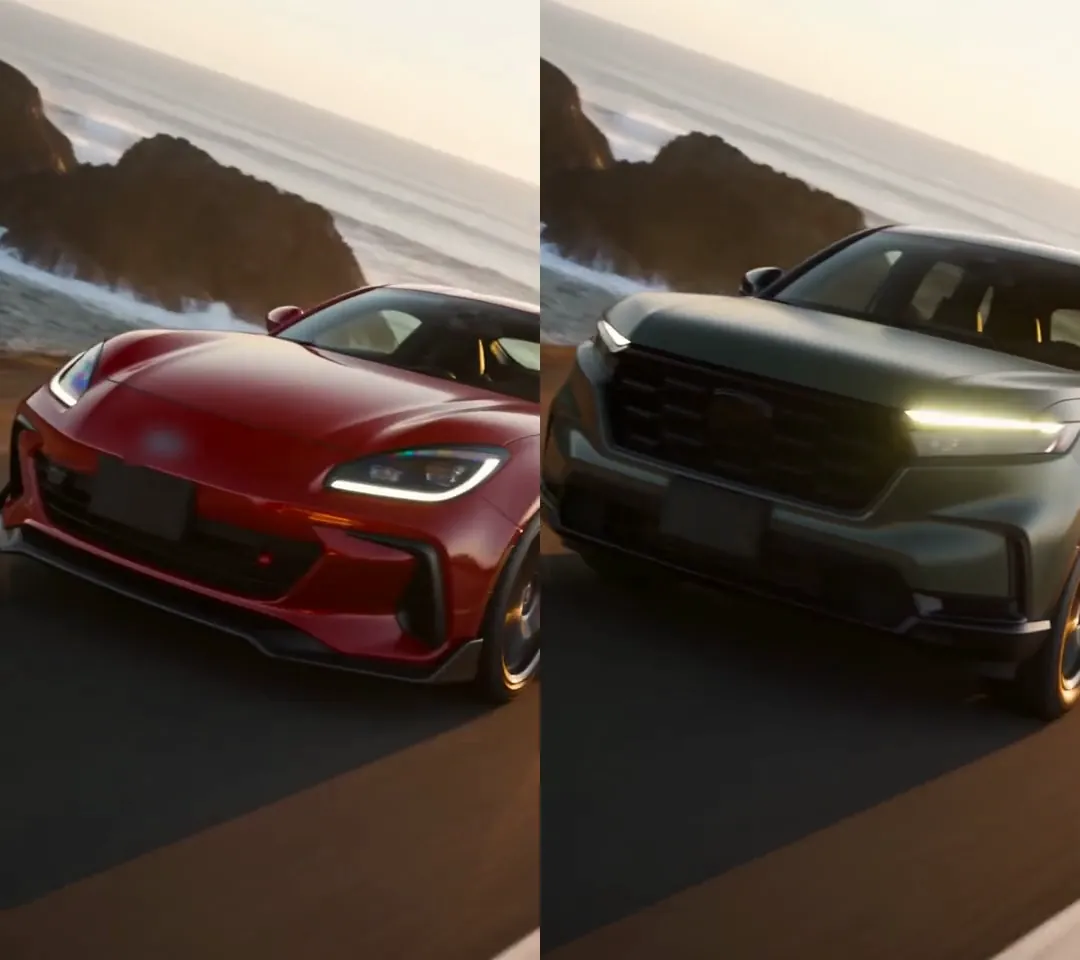
Click for the silent side-by-side: original on the left, Swap on the right, badges blurred. Seedance 2.5, 720p, 1,980 credits, about 6 minutes.
Which AI tools can replace a car in a video from your photo?
Two kinds of tool come up. Template pages such as Pippit's Car Edit Swap generate a new clip around one photo, with the template's shots and track. Video editors start from your clip and change what you name, which is what a car edit needs. Here's which of them take a photo, per each tool's own page on November 1, 2026:
| Tool | Takes a photo of your car | Source clip | Reference images |
|---|---|---|---|
| Runway Aleph 2.0 (Edit Studio) | Yes | Under 30 s, up to 10 cuts | 1, optional |
| Higgsfield Genjutsu (Object Swap) | Yes | 4 to 30 s | Up to 30 |
| Kling 4.0 | Yes | 3 to 30 s per clip, 30 s in total | Up to 10 |
| Pruna P-Video-Edit (Replicate) | Yes, optional | Up to 15 s | Up to 4 |
| FLUX Video Edit | No, a text prompt only | Up to 15 s | None |
| Riffkit Swap | Yes | Up to 45 s, 100 MB | 1 on a free account; up to 8 per render on a plan (29 on Seedance 2.5) |
None of these pages shows a car in existing footage replaced from the owner's own photos, so we ran our own test.
The test: a red coupe becomes a green SUV
The source is a 10.05-second vertical clip we made with Riffkit's Create mode on Seedance 2.0 at 720p: four shots on a coastal road at golden hour, with energetic music and engine sound. In order: a low front three-quarter tracking shot of a glossy red two-door coupe, a close-up of its spinning front wheel (five bronze-tinted spokes, red caliper), a side tracking shot at speed, and a rear shot as it drives away around S-bends. The coupe came out looking like a real sports-car model, badge included, though our prompt asked for no badges; we blurred it.
The photo is one AI-made still of a matte dark green four-door SUV, front three-quarter view, in an empty lot in overcast light, with a blank plate. We saved it to References as "My green SUV" and gave no side, rear or wheel photos.
Settings: Swap, Seedance 2.5, 720p, 9:16, no character, delivered whole, not section by section. What to change, exactly as we wrote it:
Replace the red sports coupe with the matte dark green SUV in the reference photo "My green SUV" in every shot: its body shape, color, black wheels and front. Keep everything else exactly as it is: every shot and cut, the camera moves and speed, the coastal road, the golden-hour light, the motion blur and the music.
What it cost: 1,980 credits, the same as the quote: 11 billed seconds at 180 credits a second, the Seedance 2.5 Swap rate at 720p (10.05 seconds rounds up). At Lite's price per credit that's about $9.90.
What changed in each shot
We compared the two clips every half second.
| Shot | Result |
|---|---|
| 1. Front three-quarter (0 to 1.75 s) | The SUV from the photo: tall boxy body, matte green, big black grille, thin LED light bar, blank plate, placed where the coupe was. But the wheels kept the source's bronze tint, and the rear quarter catches the sunset as champagne |
| 2. Wheel close-up (to 3.67 s) | The weakest shot. The body around the wheel turned white or silver, and the wheel kept the coupe's five-spoke design, with a red glint at the center |
| 3. Side, at speed (to about 6.2 s) | A dark olive-green SUV (darker in the low light), taller, so the roofline sits higher; dark wheels; the red calipers became silver |
| 4. Rear, driving away (to 10 s) | A rear the engine made up: a full-width light-bar tail and a real brand's badge on the tailgate (blurred). It starts slightly closer to the camera, then follows the same path |
Everything around the car held. The cuts landed within one frame of the original's (1.71 and 3.67 seconds, against 1.75 and 3.67), and the camera moves, speed, road, sea, light, motion blur and route through the bends all match. The sound is the original's: compared sample by sample, the music and engine sound are the source track (correlation 1.000). That also means the SUV drives off with the coupe's engine note.
How many photos of your car does the AI need?
The engine can only match what the photos show. Ours showed only the front, wheels small and head-on. The front shot matched it apart from the wheels' bronze tint, and was relit for the sunset though the photo was overcast. The close-up had little to go on and fell back on the source wheel. Nothing showed the rear, so the engine invented one to fit the real model it seems to have read in our photo, logo and all.
So give one photo for each angle your clip shows:
- Front three-quarter, for the opening shot
- Side profile, for tracking shots
- Rear three-quarter, for drive-aways
- A wheel close-up, if the edit has one
- The dashboard, if it has interior shots
Shoot them in similar light, on a plain background, with a blank or covered plate and no person in view or reflected in the paint: on the Seedance engines, a photo with a real person's face, reflections included, goes through a face review and can be refused. We haven't rerun the test with a photo for each angle yet, so treat the list as our next step, not a result.
Coupe to SUV is also a big change of shape. The taller body pushed the roofline up in the side shot and sat slightly closer to the camera at the start of the rear shot. We expect a swap within the same body type to hold closer, but we haven't tested one.
Will the license plate and badges come out right?
Video engines draw badges from what they recognize: our source coupe got a real brand's badge although our prompt asked for none, and the SUV's invented rear got another. The blank plate in our photo stayed blank in the front shot. Check every shot for logos and plate text, and blur or re-run anything that isn't yours before an ad. Why AI video garbles text covers lettering, and a swapped car is AI-made footage, so read how TikTok's AI label works before you post.
How to replace the car in a video with Swap
- Open Swap. It's the first card on the Make videos page.
- Add the clip. Upload a file up to 100 MB, paste a TikTok link of your own post or pick a template. Swap keeps the full length, up to 45 seconds, and refuses a longer clip rather than trimming it.
- Add your car's photos to References in the menu, one per angle.
- Pick them in the Swap form. Under "Reference images", tap Add, choose the photos and tap Done. Don't pick a character.
- Write what to change. Name the car you're replacing and the photo (type @ to pick it, or quote its name as we did), say what to take from it, and end with what must stay. More in write what changes, not a prompt.
- Pick an engine. A paid Swap starts on Seedance 2.0 at 720p; Seedance 2.5 is marked Recommended, and it's the one we used.
- Check the price and tap Riff it →. The page shows the video's length and what it will cost in credits first.
- Watch every shot before you post, especially close-ups, the rear and any lettering.
If you sell or rent cars, the same steps let one clip you own show each car on the lot: re-render it once per car, with that car's photos, and check every shot.
What it costs, and how to start free
Swap bills per second of finished video: 50 to 100 credits a second on Seedance 2.0 Fast, 60 to 300 on Seedance 2.0, 90 to 180 on Seedance 2.5 and 80 to 160 on MiniMax H3, depending on resolution. Each render bills whole seconds, rounded up, with a 4-second minimum. Failed renders aren't charged (if a run fails partway, the parts already made are), and a clip the Seedance review turns down before rendering costs nothing. Plans start at $15 a month for 3,000 credits.
New accounts start with free credits, no card needed, and can Swap on Seedance 2.0 Fast or Seedance 2.0 at 480p with one reference image. A clip under 8 seconds comes back whole; a longer one usually comes back as its first section, and a plan renders the rest. Until the account pays, its videos carry a small Riffkit watermark.
Rights: car edits and their music
We generated this clip with Riffkit, sound included. Car edits often reuse someone else's footage and a popular track, and Swap keeps the source's sound, so both need to be yours to use. To build on someone else's winning edit, Riffkit's Adapt mode keeps its formula with new footage; can you legally remake a viral TikTok covers where the line is.
Try it on your own clip
Open Swap, add a car clip of your own up to 45 seconds, pick a photo for each angle it shows, write what changes and what stays, and submit. To swap a product someone holds, see how to replace the product in a video; to replace a person, Best AI to Replace a Character in a Video; to swap a pet, our cat test.
FAQ
Which AI can replace the car in a video with my own car?
An AI video-to-video editor that takes a photo of your car along with your clip. Per the tools' own pages, read on November 1, 2026, Runway's Aleph 2.0 (one optional reference image in Edit Studio, clips under 30 seconds), Higgsfield's Genjutsu Object Swap (up to 30 reference images, 4 to 30 seconds), Kling 4.0 (up to 10 images, 3 to 30 seconds), Pruna's P-Video-Edit (up to 4 images, clips up to 15 seconds) and Riffkit's Swap (up to 45 seconds) all take a reference photo with your clip, though none of their pages shows a car swapped from the owner's own photos. FLUX Video Edit takes a text prompt only, so it can't work from your photo. In Riffkit's November 1, 2026 test on an AI-made 10-second car edit, one front photo of a green SUV replaced a red coupe: the cuts and music held and the front shot looked like the photo apart from bronze-tinted wheels, but the wheel close-up kept the coupe's wheel and the engine invented the rear, with a real brand's badge.
How do I swap the car in a car edit and keep the cuts and the music?
Use an editor that re-renders your own clip, not a template that generates a new one. In Riffkit's Swap, add the clip (up to 45 seconds), pick photos of your car under Reference images, describe the change under What to change, and end with what must stay: every shot and cut, the camera moves and speed, the road, the light and the music. Swap keeps the source's sound wherever no voice changes. In Riffkit's November 1, 2026 test, the cuts landed within one frame of the original's and the music and engine sound came back as the original track, compared sample by sample.
How many photos of my car does the AI need, and from which angles?
One photo for each angle the clip shows. In Riffkit's November 1, 2026 test, a single front three-quarter photo of an SUV was enough for the front shot, apart from the wheels' bronze tint, but the wheel close-up kept the old car's wheel and the engine invented the rear, a real brand's badge included. For a typical car edit, give a front three-quarter, a side profile, a rear three-quarter and a wheel close-up, plus the dashboard if there are interior shots, all in similar light, with a blank or covered plate and no person reflected in the paint. Riffkit hasn't rerun the test with a photo for each angle yet. A free Riffkit account keeps one reference image; a plan keeps more.
Will the license plate and the badges come out right when AI swaps a car?
Not reliably. Video engines draw badges and lettering from what they recognize. In Riffkit's November 1, 2026 test, the engine gave the SUV's invented rear a real car brand's badge on the tailgate, a part of the car the photo never showed, and Riffkit blurred it in the published comparison; the blank plate in the front photo stayed blank in the front shot. Check every shot for logos and plate text before you post or run an ad, and use photos with a blank or covered plate.
Does the engine sound change when you replace the car in a video with AI?
Not in Riffkit's Swap. Swap keeps the source's sound wherever no voice changes, so the original music and engine note come back as they were. In Riffkit's November 1, 2026 test of a sports coupe replaced by an SUV, the audio matched the original sample by sample, which also means the SUV drives off with the coupe's engine note. If your car sounds different, start from a clip whose sound fits it, or replace the audio in an editor afterwards.
Can I swap a sports car for an SUV in a video?
Yes, though a big change of shape shows. In Riffkit's November 1, 2026 test on an AI-made 10-second clip, a red two-door coupe became a green four-door SUV in the front, side and rear shots, and the camera path, speed and road held. The taller body moved the roofline higher in the side shot and sat a little closer to the camera at the start of the rear shot. In the wheel close-up, the body around the wheel turned white or silver and the wheel kept the coupe's five-spoke design. Riffkit expects a swap within the same body type to hold closer but hasn't tested one.
How long can the video be for an AI car swap?
It depends on the tool, per the tools' own pages on November 1, 2026. Riffkit's Swap takes clips up to 45 seconds and 100 MB, keeps the full length and every cut, and refuses a longer clip rather than trimming it. Runway's Edit Studio takes clips under 30 seconds with up to 10 cuts, Higgsfield's Genjutsu takes 4 to 30 seconds, Kling 4.0 takes clips of 3 to 30 seconds, Kling's VIDEO 3.0 Omni takes 3 to 10 seconds, and Pruna's P-Video-Edit and FLUX Video Edit take up to 15 seconds. Trim your edit to the tool's limit before you upload.
Can I replace the car in a video for free?
You can start free on Riffkit with no card. New accounts get free credits and can Swap on Seedance 2.0 Fast or Seedance 2.0 at 480p, with one reference image in the library. A clip under 8 seconds comes back whole; a longer one usually comes back as its first section, and a plan renders the rest. Until the account pays, its videos carry a small Riffkit watermark. Plans start at $15 a month for 3,000 credits. Riffkit's own car test used Seedance 2.5 at 720p, which needs a plan, and cost 1,980 credits.
Keep reading
Replace the Pet in a Video with Your Own Pet (Real AI Test)
Replace the pet in a video with your own cat or dog and keep every shot: which AI tools take a pet photo, which photos to give, and our shot-by-shot cat test.
Can ChatGPT Edit Videos? What It Can and Can't Do (2026)
ChatGPT has no video editor of its own. What it does with a clip, the plugins that edit inside ChatGPT, and an outfit change we tested in Riffkit.
Can Claude Analyze Videos? Three Ways That Work (2026)
Claude can't open a video file by itself. Three ways to get a video analyzed in Claude, and a real breakdown of our own clip, checked frame by frame.