Replace the Pet in a Video with Your Own Pet (Real AI Test)
To put your own pet into a video you already have, use an AI video editor that takes a photo of your pet and re-renders the clip with the change, not a trend template that turns one photo into a new clip. We tested the editing kind on November 1, 2026, with Riffkit's Swap: the orange tabby in a 10-second, three-shot cat-toy clip became a blue-gray British Shorthair from one photo. Every shot, cut and movement held, and the sound is the original's; the eyes came out darker in the backlit close-up, and the new cat is bulkier. It cost 1,980 credits on Seedance 2.5 at 720p and took about 6 minutes. In short: open Swap, add the clip, pick your pet's photo under Reference images, and write what changes and what must stay. Disclosure: we make Riffkit. The clip and the "my cat" photo are stand-ins we generated with AI, because someone else's TikTok isn't ours to edit and none of us owns a gray cat.
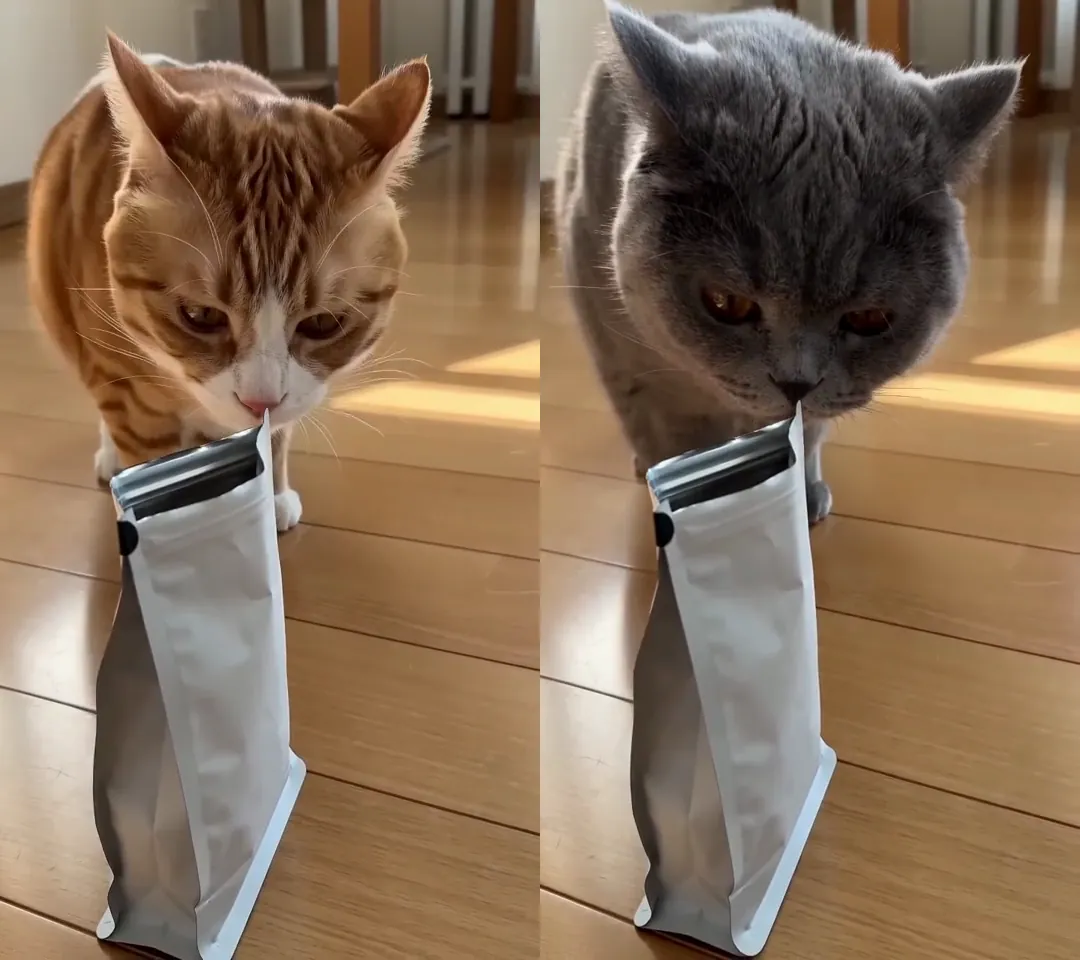
Click for the silent side-by-side of the whole clip, the original on the left and the Swap on the right. The sniffing shot (shot 3) is shown here. Swap on Seedance 2.5, 720p, 1,980 credits, about 6 minutes from upload to finished video.
Which AI can replace the pet in a video with your own pet?
There are three kinds. Photo-to-trend templates, such as Dreamina's "Put a Ring on It dog" page, are what many "put my dog in this video" searches turn up: one photo in, a new clip out, your footage unused. Character-replace models were built for people: Pruna's P-Video-Replace examples use a dog photo to replace a person, which fits the "my dog in place of the dancer" trend, but none of its pages shows an animal in the source being replaced. Video editors re-render your own clip with the change and keep the rest. What they take, per their own pages on November 1, 2026:
| Tool | Photos it takes | Source clip |
|---|---|---|
| Runway Aleph 2.0 (Edit Studio) | 1 optional reference image | Under 30 seconds, up to 10 cuts |
| Kling VIDEO 3.0 Omni | Up to 4 images or elements with a video | 3 to 10 seconds |
| Kling 4.0 | Up to 10 images | 3 to 30 seconds a clip, 30 in total |
| Higgsfield Genjutsu, Object Swap | Up to 30 (Genjutsu Lite: 10) | 4 to 30 seconds |
| Pruna P-Video-Edit | Up to 4 | Up to 15 seconds |
| FLUX Video Edit | None: text only | Up to 15 seconds |
| Riffkit Swap | 1 on a free account; on a plan, up to 8 per render (29 on Seedance 2.5) | Up to 45 seconds and 100 MB |
None of these pages shows a worked example of replacing the pet in your footage with your own; Kling 4.0's one corgi example is restyled, not swapped.
The test: an orange tabby becomes a gray cat
The source is a 10.08-second vertical clip we made with Riffkit's Create mode, standing in for yours. An orange tabby with a white chest, muzzle and paws bats a feather wand on a wooden floor (shot 1), crouches far away and pounces to pin the feather (shot 2), then sniffs a plain white treat pouch and licks its lips at the very end (shot 3).
The photo is a still we generated, also a stand-in: one front view of a blue-gray British Shorthair with copper eyes, sitting on a white sofa. We added it to References as "My gray cat" and picked it in the Swap form, with no character. Settings: Seedance 2.5, 720p, 9:16. What to change, exactly as we wrote it:
Replace the orange tabby cat with the gray cat in the reference photo "My gray cat" in every shot: the same blue-gray British Shorthair coat, copper eyes and round face. Keep everything else exactly as it is: every shot and cut, the cat's movements and timing, the feather toy, the white treat pouch, the wooden floor, the light and the sound.
The quote was 1,980 credits: 11 billed seconds (10.08 rounds up) at 180 credits a second, the Seedance 2.5 Swap rate at 720p. We were charged exactly that, and it was done about 6 minutes after the upload.
What changed in each shot
We compared the two videos every half second.
| Shot | Original | Result |
|---|---|---|
| 1 (0 to 1.8 s) | White paws bat a feather wand | Solid gray legs and paws, no stripes; the same swipes |
| 2 (1.8 to 3.4 s) | A crouch, a pounce at the camera, the feather pinned | The same moves at the same moments; the body rounder mid-pounce |
| 3 (3.4 to 10 s) | A sniff at the white pouch, a lick at about 9.8 s | The same sniff and lick; darker eyes, a bulkier cat |
What held. Both cuts land within one frame of the original's, and every movement keeps its timing. The wand, the pouch, the floor, the window light and the sun patches are identical. The sound is the original's, untouched: compared sample by sample, the two audio tracks correlate at 1.000. The cat is blue-gray in every frame, with no orange left, a round face and, outside the backlit close-up, copper eyes; the tabby's white patches turned gray, like the photo's cat. At half-second steps we saw no extra legs, melting or flicker.
What drifted:
- The eyes in shot 3. In that backlit close-up they read deep amber to red-brown, darker than the bright copper in the photo.
- The build. The gray cat is bulkier, with a larger head: a British Shorthair's build, not the slimmer tabby's. The pouch covers less of its chest, and its body is rounder in the pounce.
The motion comes from the source and the body from your photo, so a pet built differently fills the frame differently. This was one run, with one photo of a cat without markings. We haven't tested a dog, a cat-to-dog swap, one-sided markings, a hand in the shot, captions, the free 480p engines or real phone footage.
Which photos of your pet does the AI need?
- One clear, front-on photo of the whole pet. That is what we used: the coat and face followed it in every shot, and the eyes did too, except in the backlit close-up, where they came out darker.
- A photo of each angle the clip shows that the first photo doesn't. In a car test the same day, also from one front photo, the rear and a wheel close-up came out furthest from it. A pet seen from behind, or from its marked side, needs that side in a photo.
- No people in the photo. On the Seedance engines a photo with a real face goes through a face review and can be refused.
- A source animal your pet can play. Swap keeps the source's movements, so a dog drawn into a cat's clip would make the cat's moves.
How to replace a pet in a video with Swap
- Open Swap. It's the first card on the Make videos page.
- Add the clip. Upload a file up to 100 MB, paste a TikTok link of your own post or pick a template. Swap keeps the full length, up to 45 seconds.
- Add your pet's photo to References in the app's menu, with a name you'll write in the brief.
- Pick it. Under the character picker, tap Add next to "Reference images (optional)", choose the photo and tap Done. Pick no character: the photo is the change.
- Write "What to change". Name the animal to replace, the photo, the coat, eyes and face, and say "in every shot". Type @ to pick the photo, or write its name as we did. End with what must stay (more on the brief).
- Pick an engine. A paid Swap starts on Seedance 2.0 at 720p; Seedance 2.5 is marked Recommended, and we picked it.
- Check the price and submit. The page shows the video's length and what it will cost in credits before you tap Riff it →.
- Watch every shot before you post.
Pet-product videos for TikTok Shop
If you sell cat toys or treats as an affiliate, a clip of yours that already sells can carry another pet: yours, or another breed for another audience. In our test the wand and the pouch came back identical. Our pouch was plain; packaging text is redrawn with the frame, so check labels against the real product (why AI video garbles text). TikTok Shop videos without the product covers other routes.
An AI pet using a product is a depicted demo, not a review. Don't show results the product doesn't deliver, or present the re-rendered pet as footage of your real one. Turn on TikTok's AI-generated content label before you post: it's off by default, set per post, and can't be added later (TikTok's AI label).
Can you put your pet into someone else's TikTok?
Not as is. Swap keeps the source's sound and everything you don't name, so use a clip you shot, made or licensed, and a photo of your own pet. A trend sound isn't cleared just because a trend uses it. For someone else's winning pet video, Adapt, another Riffkit mode, keeps the formula and makes new footage; see can you legally remake a viral TikTok?
What it costs, and how to start free
| Engine | Swap credits per second of finished video |
|---|---|
| Seedance 2.0 Fast | 50 at 480p, 100 at 720p |
| Seedance 2.0 | 60 at 480p, 120 at 720p, 300 at 1080p |
| Seedance 2.5 | 90 at 480p, 180 at 720p |
| MiniMax H3 | 80 at 768P, 160 at 2K |
Each render bills whole seconds, rounded up (4 seconds minimum); failed renders aren't charged. At plan rates, our test's 1,980 credits work out to about $9.90 on Lite or $8.91 on Studio. Plans start at $15 a month for 3,000 credits.
New accounts get free credits with no card, keep one reference image (one photo of your pet) and can Swap on Seedance 2.0 Fast 480p or Seedance 2.0 480p. A clip under 8 seconds comes back whole; a longer one, like ours, usually comes back as its first section, and a plan finishes the rest. Videos made on the free credits carry a small Riffkit watermark, which any plan removes from every video.
Try it on your own clip
Open Swap, add a pet clip of your own, pick your pet's photo, write what changes and what stays, and submit. To swap the toy or treat, see how to replace the product in a video; to replace a person, the best AI to replace a character; for clothes, how to change an outfit in a video.
FAQ
Which AI can replace the pet in a video with my own pet?
Use an AI video editor that takes a reference photo, not a trend template that makes a new clip from one photo. As of November 1, 2026, Runway Aleph 2.0 (one optional reference image, clips under 30 seconds), Kling VIDEO 3.0 Omni (up to 4 images, 3 to 10 seconds), Kling 4.0 (up to 10 images), Higgsfield Genjutsu's Object Swap (up to 30 images, 4 to 30 seconds), Pruna P-Video-Edit (up to 4 images, 15 seconds) and Riffkit's Swap (up to 45 seconds) all edit a clip from photos and a description. FLUX Video Edit takes no image, so it can't use your pet's photo. In Riffkit's own test, Swap turned an orange tabby into a gray British Shorthair from one photo across all three shots of a 10-second clip, with the same cuts, movements and sound.
How do I put my dog into a video I already have?
Use an editor that keeps your clip and takes a photo of your dog. In Riffkit: open Swap, add the clip (up to 45 seconds and 100 MB), upload your dog's photo to References and pick it under Reference images. Then, under What to change, name the animal to replace and the photo, say "in every shot", and list what must stay: shots, cuts, movements, props and the sound. The page shows the price before you submit. Riffkit's own test, on November 1, 2026, swapped a cat for another cat; a dog hasn't been tested yet, so check every shot before you post.
How many photos of my pet does the AI need?
One clear photo of the whole pet, seen from the front, can be enough for shots that show it from the front: in Riffkit's test, one front photo of a gray cat kept the coat and face in all three shots of a 10-second clip, and the copper eyes in all but a backlit close-up, where they came out darker. Add a photo of each angle the clip shows that the first photo doesn't, such as the back or a marked side, or expect the engine to fill those in. Keep people out of the photos: on the Seedance engines a photo with a real face goes through a face review and can be refused. A free Riffkit account keeps one reference image; on a plan a render takes up to 8, or 29 on Seedance 2.5.
Will my pet look exactly like my photo in every shot?
Close, but check each shot. In Riffkit's November 1, 2026 test, the gray cat from the photo appeared in every frame with no orange left from the original tabby, but in a backlit close-up its copper eyes came out a darker amber to red-brown, and it looked bulkier than the slimmer cat in the source, so a treat pouch covered less of its chest. The motion follows the source and the body follows your photo, so a pet built differently from the original fills the frame differently.
Can I swap a cat for a dog in a video with AI?
You can ask for it, but expect the dog to make the cat's moves. Video editors such as Riffkit's Swap keep the source's movements and timing and redraw the animal from your photo, so a cat's pounce stays a pounce. Riffkit has tested a cat-to-cat swap only (an orange tabby to a gray British Shorthair, November 1, 2026), not cat to dog. For the trend that puts a dog in place of a dancer, Pruna's P-Video-Replace documents using a dog photo to replace a person in a clip.
Can I use someone else's pet TikTok and put my pet in it?
Not as is. An edit such as Riffkit's Swap keeps the source's shots and sound, and the footage and audio in someone else's TikTok belong to them, even with your pet drawn in. Use a clip you shot, made or have a license for. For someone else's winning pet video, Riffkit's Adapt mode keeps the formula (the hook, the pacing, the beats) and makes new footage. A trend sound isn't cleared for you just because a trend uses it.
Do I have to label an AI pet video on TikTok?
Yes, label it. A pet redrawn by AI, with Riffkit's Swap or any other editor, is AI-altered media, which TikTok's disclosure rules cover. In TikTok's upload flow the AI-generated content setting is off by default and set per post, and it can't be added after the post is published, so turn it on before you post. For a product video, also don't show results the product doesn't deliver: an AI pet using a product is a depicted demo, not a review.
Can I replace a pet in a video for free?
You can start free on Riffkit with no card. New accounts get free credits, keep one reference image (one photo of your pet) and can Swap on Seedance 2.0 Fast or Seedance 2.0 at 480p. A clip under 8 seconds comes back whole; a longer one usually comes back as its first section, and a plan finishes the rest. Free videos carry a small Riffkit watermark, which any plan removes from every video. Plans start at $15 a month for 3,000 credits. Riffkit's own pet test ran on Seedance 2.5 at 720p, which comes with a plan, and cost 1,980 credits for a 10-second clip.
Keep reading
Replace the Car in a Video with Your Own Car (Real AI Test)
Replace the car in a video with your own using AI and keep the cuts, camera moves and music. Our coupe-to-SUV test: what held, what failed, the photos to give.
Can ChatGPT Edit Videos? What It Can and Can't Do (2026)
ChatGPT has no video editor of its own. What it does with a clip, the plugins that edit inside ChatGPT, and an outfit change we tested in Riffkit.
Can Claude Analyze Videos? Three Ways That Work (2026)
Claude can't open a video file by itself. Three ways to get a video analyzed in Claude, and a real breakdown of our own clip, checked frame by frame.