Kling Motion Control Alternative: Same Shots and Cuts, Your Character
Kling Motion Control takes one image of a character and a short reference video, and makes the character move like the person in the video. For that job it is a strong tool. If you're looking for a Kling Motion Control alternative because you have a finished video with several shots and cuts, and want it back with your own character, product, setting or look, Riffkit Swap keeps the shots, cuts, camera moves and timing of a source of up to 45 seconds, in one job.
Higgsfield's Motion Control runs Kling's model, so the same holds if you want a Higgsfield Motion Control alternative.
What Kling Motion Control does well
As of October 2026, per Kling's Motion Control guide and feature page:
- Motion from a video, look from one image. Body movement, facial expressions and gestures carry from the reference onto your character. Human, anime and 3D characters all work.
- Refined over two versions. Kling's guide says Motion Control was introduced with VIDEO 2.6. VIDEO 3.0 (guide dated March 5, 2026) holds the face steadier through complex, multi-angle and long motions, and Element Binding lets you bind a saved face.
- Strong in testing. In the Kling team's March 2026 technical report, human raters preferred its results to Dreamina, Runway Act-Two and Wan-Animate.
- Easy to reach. It runs in Kling's web, desktop and mobile apps, its API, and on Higgsfield.
The reference runs 3 to 30 seconds and shows one character in one continuous shot. Kling's guide says to "avoid cuts and camera movements in the motion reference." Output follows the reference's length, up to about 10 seconds when the character's orientation matches the image and about 30 when it matches the video.
Kling 4.0, as of October 6, 2026: Kling says 4.0 Flash opened to a limited group of users for early access on September 28, with the full model due in October. Its 4.0 pages say reference videos can guide movement and camera direction, but they don't name a Motion Control 4.0. The dedicated tool is still documented for VIDEO 2.6 and 3.0.
A Kling Motion Control alternative for whole videos
Swap starts from a whole video whose shots you already want.
- What stays: the camera, cuts, framing, motion and timing, plus the source's music, language and aspect ratio. A long source is split at its shot cuts and reshot window by window.
- What changes: only what you name. A saved character replaces the person on screen, a product with images goes into the shot, or one line in "What to change" moves the setting, changes an outfit or restyles the whole video.
- Length: up to 45 seconds in one job, never compressed. A longer source is turned away, not trimmed.
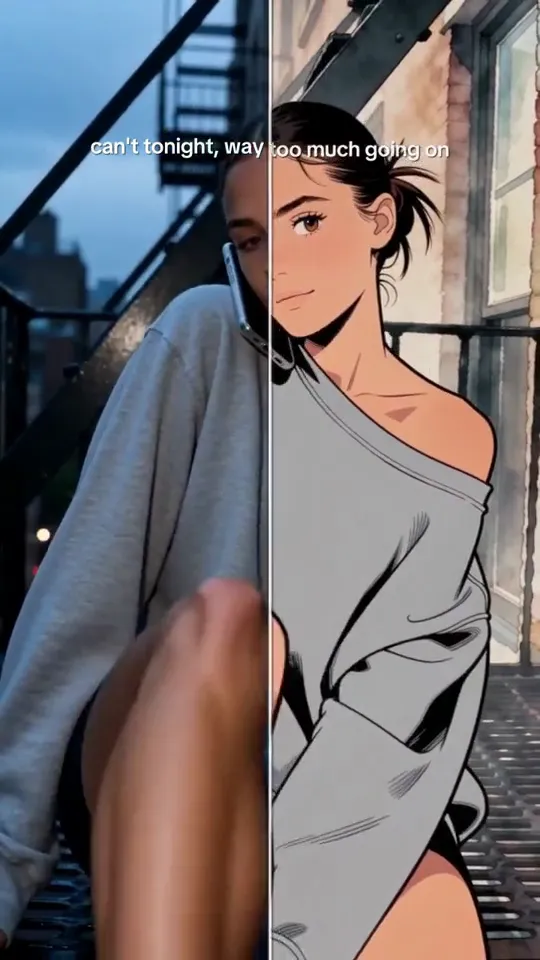
Click to play the silent comparison: our own clip, reshot in Swap as 1990s anime on Seedance 2.5 at 720p, 12 seconds for 2,160 credits. Shots, poses, cuts and timing held; the chandeliers and columns stayed semi-realistic.
We also reshot 30 seconds of STORM II as 90s anime in one job (Seedance 2.5, 720p, 5,400 credits). The footage and song belong to GENER8ION (Surkin and Romain Gavras), starring Yung Lean, with choreography by Damien Jalet. Ours is a non-commercial demo, so watch it on YouTube; our STORM II walkthrough has the steps.
Kling Motion Control vs Riffkit Swap
| Kling Motion Control | Riffkit Swap | |
|---|---|---|
| You start from | One character image plus a motion reference video | A whole video: a template, an upload (up to 100 MB) or a TikTok link |
| Reference | 3 to 30 seconds, one continuous shot | Up to 45 seconds, cuts and camera moves included |
| What carries over | Body movement, facial expressions, gestures; camera movement when orientation matches the video | Camera, cuts, framing, motion, timing, music, language, aspect ratio |
| Output length | Follows the reference, about 10 or 30 seconds by orientation mode | The source's full length |
| Characters | Human, anime or 3D, from one image; one primary subject | A saved character from one reviewed photo; one video per character |
| Other changes | In 2.6, a prompt can set the background and details | A product with images, or anything written in "What to change" |
| Speech | Kling points to standard Video 3.0 for speech and lip sync | On Seedance 2.5 and MiniMax H3, a new voice for on-camera lines; narration keeps the original |
| Where | Kling web, apps and API; Higgsfield | Riffkit web app; Claude or ChatGPT with the Riffkit connector |
How to do it in Swap
- Set up your character once. In the web app, add a name and one photo: one person, facing the camera, face large, plain background. Review usually takes under a minute. A collage or a sheet of poses usually fails to replace the face in a close-up (why a reference image helps).
- Open Swap and pick a template, an upload or a TikTok link, up to 45 seconds.
- Name the change: the character, a product with images, or one line in "What to change". With no character, the original person stays. A new person described only in words can change face between shots.
- Read the quote. The price shows before anything renders. For an upload or a link it's an estimate until Riffkit has the file.
- Submit. If nothing would change, or the source runs past 45 seconds, the job stops before anything is billed. On the Seedance engines each window first passes the video vendor's content review, so a new source's first swap can wait several minutes.
Prefer a chat? Replace the person in a video runs the same swap from Claude or ChatGPT.
What a swap costs
Swap bills per second of finished video, at its own rates (credits per second):
| Engine | 480p | 720p | Higher |
|---|---|---|---|
| Seedance 2.0 Fast | 50 | 100 | – |
| Seedance 2.0 | 60 | 120 | 300 at 1080p |
| Seedance 2.5 | 90 | 180 | – |
| MiniMax H3 | 80 at 768P | – | 160 at 2K |
Paid accounts default to Seedance 2.5 at 720p, the engine we recommend for swaps. Each character is its own video, and each render window bills whole seconds, rounded up. Failed renders aren't charged; seconds already rendered stay charged.
Free start: no card needed. Free accounts swap on Seedance 2.0 Fast or Seedance 2.0 at 480p, or MiniMax H3 at 768P. A short clip comes back whole, and most longer ones start with a free first section; a plan finishes the rest. Plans start at $15 a month for 3,000 credits.
Which one fits
- Kling Motion Control starts from one image and one continuous shot, and keeps the performance: body, face and hands. Pick it to make one picture of your character perform a move.
- Riffkit Swap starts from the finished video and keeps the edit: shots, cuts, camera moves, timing and music. Pick it when a video already works and you want it back with your character, product, setting or look.
- Higgsfield Genjutsu's Motion Transfer also keeps a source's motion, camera and timing, for 4 to 30 seconds. Our Genjutsu alternative guide sets it next to Swap.
Keep Swap for your own videos and templates: the people and music in someone else's video stay theirs. For another creator's winner, Riffkit's Adapt mode keeps the beats and rebuilds the video with your story (where the legal line sits).
Bring a video of up to 45 seconds and open Swap.
Kling and Higgsfield facts checked October 6, 2026, from Kling's Motion Control guide, feature page, Motion Control tutorial, technical report and Kling 4.0 post, and Higgsfield's Motion Control page, Motion Control 3.0 post, changelog and Genjutsu page.
FAQ
What is the best Kling Motion Control alternative?
It depends on what you start from. As of October 2026, Kling Motion Control animates one character image with the motion of one continuous reference shot of 3 to 30 seconds, and it handles human, anime and 3D characters well. If you start from a finished video and want the same shots, cuts, camera moves and timing back with your own character, product, setting or look, Riffkit's Swap mode does that for a source of up to 45 seconds in one job, running on Seedance and MiniMax H3 engines. Higgsfield Genjutsu's Motion Transfer also keeps a source's motion, camera and timing, for 4 to 30 seconds.
Can Kling Motion Control keep the cuts and camera moves of a video?
Kling builds Motion Control around one continuous shot. As of October 2026, its guide asks for a reference of 3 to 30 seconds showing a single character, visible throughout, and says to avoid cuts and camera movements in the motion reference. Within that shot it transfers body movement, facial expressions and gestures onto your character image, and Kling's tutorial says that when the character's orientation is set to match the video, camera movement follows the reference too. To keep a whole video's cuts as well, start from the whole video: Riffkit Swap reshoots a source of up to 45 seconds and keeps its shots, cuts, framing, camera moves and timing, changing only the person, product or detail you name.
Is Higgsfield Motion Control the same as Kling Motion Control?
Yes. As of October 2026, Higgsfield's Motion Control page says it is powered by Kling VIDEO 2.6, and Higgsfield announced Kling Motion Control 3.0 on its platform on March 5, 2026. Higgsfield's own video-to-video tool is Genjutsu, whose Motion Transfer mode keeps a source's motion, camera and timing for clips of 4 to 30 seconds. Riffkit Swap does that whole-video job for a source of up to 45 seconds.
Is Kling 4.0 out, and does it have Motion Control?
As of October 6, 2026, Kling says Kling 4.0 Flash opened to a limited group of users for early access on September 28, and the full model is due in October with no exact date announced. Kling's 4.0 pages say reference videos can guide performance, movement and camera direction, but they don't mention a Motion Control 4.0. The dedicated Motion Control tool is documented for Kling VIDEO 2.6 and 3.0.
How long can a Kling Motion Control or Riffkit Swap video be?
As of October 2026, Kling Motion Control takes a reference video of 3 to 30 seconds, and the output follows its length: up to about 10 seconds when the character's orientation matches the image, and about 30 seconds when it matches the video. Riffkit Swap takes a source of up to 45 seconds and returns it at full length in one job, never compressed. A longer source is turned away rather than trimmed.
Can I try Riffkit Swap for free?
Yes. Sign up with no card. A short clip comes back whole, and most longer ones start with a free first section; a plan finishes the rest. Free accounts swap on Seedance 2.0 Fast or Seedance 2.0 at 480p, or MiniMax H3 at 768P. Seedance 2.5, which Riffkit recommends for swaps, and 720p come with a plan, from $15 a month for 3,000 credits. Billing is per second of finished video, from 50 credits a second on Seedance 2.0 Fast at 480p, and failed renders aren't charged.
Keep reading
Change Outfit in Video with AI: New Clothes, Same Shots and Cuts
Change clothes in a video with AI and keep every shot and cut. Our real test: the exact brief, a silent before and after, the cost and what drifted.
Seedance Character Swap: Replace a Character, Keep Every Shot
How to do a Seedance character swap: set up a character from one photo, then reshoot a clip with the same shots and cuts. Steps, engines and rates.
Video to Anime Converter: Turn a Real Video into Anime, Same Shots and Cuts
Turn a real video into anime or a cartoon look and keep its shots, cuts and timing. The exact brief we used, a silent before and after, per-second costs and what didn't work.