Higgsfield Katana Alternative: Reshoot a Video That Worked
Higgsfield Katana, released on October 8, 2026, takes a reference edit and recreates it inside Claude with your own people, products or clothes. If you want a styled edit built from a preset, Katana is built for that job. We have not run Katana ourselves: everything about it on this page comes from Higgsfield's own pages, and our walkthrough covers the setup and every step.
People still look for a Katana alternative for practical reasons: it needs an active Higgsfield subscription, it takes uploads rather than links, its limits for your own video are not documented, or what they want back is a video of their own that already performed, with one thing in it changed and nothing else touched. This page maps what Katana is good at, how the jobs under "recreate this video" differ, and when a reshoot in your own pipeline fits better.
The short answer, if a video already worked and you want it back with your person or product in it: Riffkit has a mode for that, called Swap, and it runs in the web app and inside Claude. It reshoots your own video or a template at full length, keeping the shots, cuts, sound and frame shape and changing only what you name. Every new account gets free credits with no card: a short clip comes back whole, and most longer ones start with a free first section that a plan finishes from the same script. When the winner belongs to another creator, its Adapt mode keeps only the beats and replaces the footage, the story and the product with yours, for the TikTok Shop policy reason covered below.
Selling a product? Save it once with a clean photo (several on a plan) and it goes on camera in the remade video, in Swap or in Adapt. See how product placement works, or the TikTok Shop version. When you want whole videos rather than a first section, the plans are here.
What Katana is good at
- Whole edits, not single shots. Higgsfield's Katana page: "Pick a reference edit. Katana recreates it with your inputs, from the pacing and transitions to the visual style." Its blog adds that it follows the reference's shot order, pacing and cuts.
- A preset catalog in the chat.
/katanaopens it,/katana/<preset-name>runs one, and presets come in three categories: Personalized edits, Style transfer and Motion transfer. Community presets go live as soon as they are shared. - Edits that are hard to prompt. The launch post on X pitches "editable motion graphics, product launch videos, or aura-farming edits", the kind of transitions-and-graphics work that a single video model does not hand you in one go.
- Corrections in plain words. You ask Claude to change a shot or swap a photo, and in Higgsfield's own test "only the affected shots were regenerated."
- The price before you confirm. Claude shows a card with the exact credit cost before each generation, and Higgsfield states there is "no separate billing for MCP and no markup for running Katana inside Claude."
If you already pay for Higgsfield, live in Claude and want a styled edit from a preset, start there. The rest of this page is for the cases that do not fit.
Where it asks a lot of you
A subscription first. Higgsfield's blog: "It requires an active Higgsfield subscription and no API key." Katana runs on the credits of that plan.
Up to five photos, uploaded in Higgsfield's window. Katana takes up to five photos of the people, products or clothing per edit. Higgsfield's blog says images attached directly in the Claude chat are not passed to Higgsfield MCP as Katana reference files, so a Higgsfield upload window opens instead.
No social links. "Links to Instagram or TikTok profiles are not accepted; the reference has to be uploaded as a file." A direct link to a media file works.
Gaps in the documentation. For your own reference video, Higgsfield's pages state no maximum length, no per-edit credit cost and no generation time, and say nothing about voices; in Higgsfield's own test the reference's track came back unchanged. Our how-to lists each gap and where the pages disagree.
Three jobs that all sound like "recreate this video"
"Recreate this video" covers three different jobs. Sort them by what you start from and the choice gets easy.
Restyle into a known edit. You start from a style you like, a preset or a reference edit, and want your product or person inside it. That is Katana's home ground: pick a preset from the catalog and add your photos.
Reshoot a video that already worked. You start from a video of your own that performed, and you want the same video back with one thing changed: the person, the product, the outfit, the place. What matters is that the shots, timing and sound stay put, so the thing that made it work survives. Katana can take your own video as its reference too. Riffkit's Swap is built for this one job: it also takes a template or a TikTok link to one video, has a stated limit of 45 seconds, and reuses a saved character, product or reference image across videos. Inside Higgsfield, Genjutsu also rebuilds part of a clip, on clips of 4 to 30 seconds.
Make your own version of someone else's winner. You start from another creator's video and want a new video that follows its beats with your story and your product. Mirroring their shots is the risky move here (see the TikTok Shop rule below), so this job wants a rebuild, not a reshoot. That is Riffkit's Adapt mode.
Other ways to get there
If all you need is your clips and photos dropped into a ready-made edit, a template editor such as CapCut's templates does it without generating anything new. For hosted tools that start from a winning short-form video, we keep a six-tool breakdown in AI tools that recreate viral TikToks, compared.
The alternative for a video that already worked: Riffkit Swap
Swap, the Riffkit mode from the top of this page, handles one request: this video already worked, give me the same video with my change in it.
A swap reshoots the source on the source's own clock. The camera, the cuts, the framing, the action, the timing, the sound, the language and the frame shape carry over at full length, never shortened. The only things that move are the ones you name:
- A saved character replaces the person on screen. Pick no character and the original person stays. A character made from one clear photo is the reliable way to hold a face steady across shots, for the reasons we covered here.
- A product with photos, always on camera, worked into the beat where the old product was.
- A reference image from your library: an outfit for the person to wear, or a place.
- Anything you write in "What to change", in plain words: move it outdoors, change the jacket, restyle the whole video as anime or clay.
What you name is what changes. Name nothing and there is nothing to swap, so the job won't submit.
Our own tests, with numbers
Every source below is a video we made ourselves in Riffkit, reshot with Swap on Seedance 2.5 at 720p. We publish what drifted along with what held.
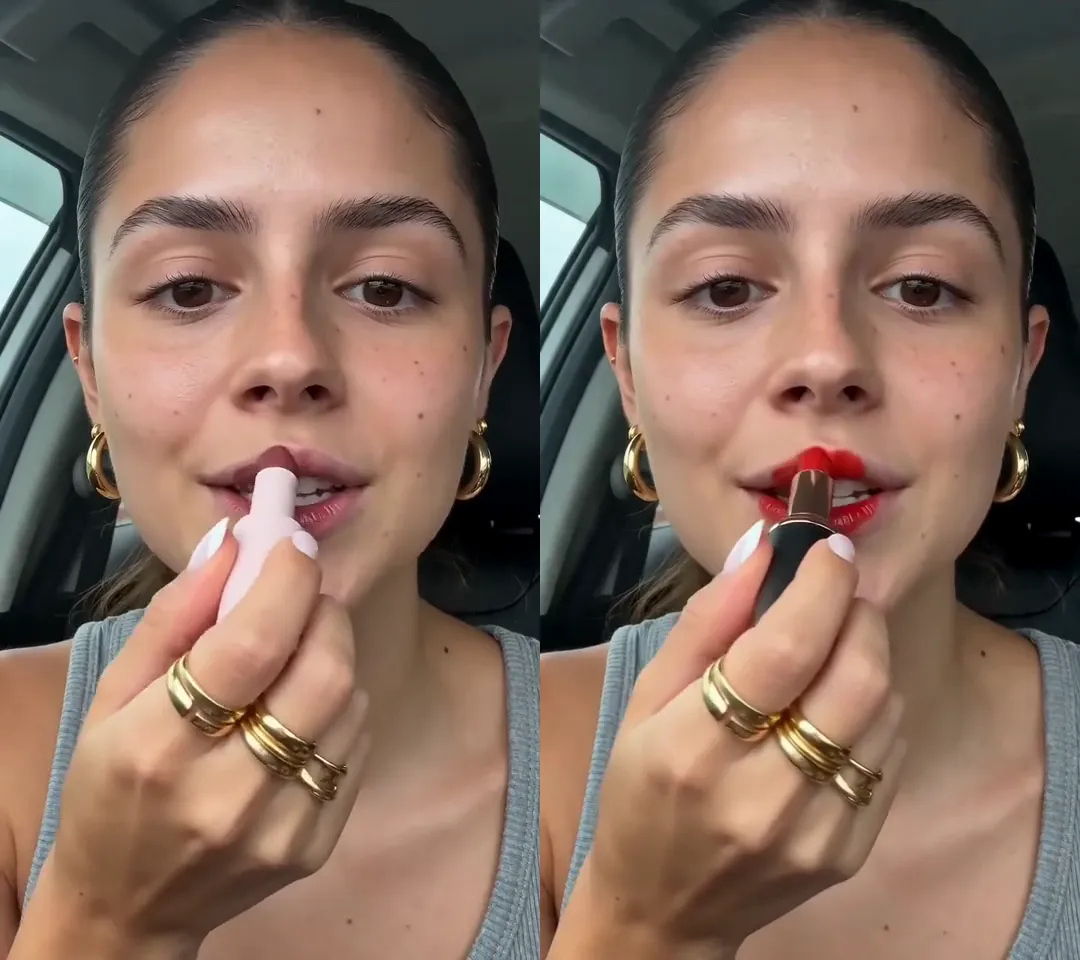
Click for the silent side-by-side: the original on the left, the Swap on the right. 15 seconds, 2,880 credits, about 14 minutes from upload to video.
- A product. A 15-second Spanish lipstick clip with "What to change" left empty and a product saved with two photos: 2,880 credits, about 14 minutes. The new lipstick is in every beat and the face, jewellery and car stayed. The shade drifted to dusty rose at about 9 seconds, and the creator still says "este glos" (this gloss) over the new product, because Swap keeps the source's words unless you ask for a change, so pick a source whose lines fit your product. The full test.
- A background. An 8-second, four-shot clip moved from a living room to a beach boardwalk with a written brief: 1,620 credits, about 10 minutes. The same beach held in all four shots and the original voice track stayed; a necklace vanished in one shot and the sky warmed from shot to shot. The full test.
- An outfit from a photo. A 12-second clip with a flat-lay gown photo named in "What to change": 2,340 credits, about 8 minutes. The gown, clutch and earrings came through and the cuts and caption held; on the red carpet the gown matched the photo only after about a second and a half. The full test.
- A whole new look. The same 12-second clip restyled as 1990s cel animation: 2,160 credits, about 10 minutes. Shots, poses, cuts and the caption held, while the chandeliers and columns on the red carpet stayed semi-realistic. The full brief.
Riffkit inside Claude, too
Katana's draw is that it lives in your Claude chat. So does Riffkit. Add Riffkit's connector to Claude or ChatGPT, sign in on riffkit.ai (no API key), and ask in plain words for the swap you want, starting from a TikTok link, a template or your own file. Files come in through an upload link rather than as chat attachments, characters are made once in the web app, and the jobs run on the same credits and rates as the app. Replace the product in a video and replace the person in a video show the requests; making videos in ChatGPT and Claude covers the setup for each assistant.
What a Swap job looks like
- Pick the source. A template from the library, an upload of up to 100 MB, or a TikTok link to one specific video, up to the render cap (currently 45 seconds). A longer source is refused, not trimmed. To reshoot a video you already made in Riffkit, download it and upload it as the source.
- Name the change. Pick a character, a product with photos or a reference image, or write one line in "What to change".
- Leave the rest alone. Swap has no aspect ratio, language or music control, because all three follow the source.
- Read the quote before you submit. Each engine shows its per-second rate, and a template shows the billed seconds and the total. An upload or a link gets an estimate from the length your browser measures or the link reports, settled once Riffkit has the file.
- Let it refuse. If nothing you picked would change anything, or the source runs past the cap, the job stops before a single second is billed. On the Seedance engines, the source also passes the video vendor's content review before the first paid render, so a refused clip costs nothing.
A swap carries the source into every render, so it has its own per-second rates: Seedance 2.5 at 90 credits a second at 480p and 180 at 720p, Seedance 2.0 at 60, 120 and 300 (480p, 720p, 1080p), Seedance 2.0 Fast at 50 and 100, and MiniMax H3 at 80 at 768P and 160 at 2K. A free account can swap on Seedance 2.0 Fast or Seedance 2.0 at 480p, and its videos carry a small Riffkit watermark that any plan removes. Seedance 2.5, which we recommend for swaps, MiniMax H3, and 720p and above on any engine come with a paid plan.
The rule that decides whose video you reshoot
TikTok Shop's unoriginal-content policy names "Recreating a video that directly mirrors the actions of another creator's content" and, separately, "Using AI-generated content that results in duplicate or highly similar videos to other creators". Freshly generated frames are not an exemption, because the rule measures how closely the result mirrors someone else. Katana sets its own condition the same way: a reference "that you own or have permission to use", music included. So point Swap at your own videos and at templates, and when the winner belongs to someone else, adapt it instead; can you legally remake a viral TikTok covers the legal side, and the compliant remake playbook covers choosing a winner.
Katana vs Riffkit Swap at a glance
| Higgsfield Katana | Riffkit Swap | |
|---|---|---|
| Where it runs | Claude, through Higgsfield's connector; the web form hands off to Claude | The Riffkit web app, or Claude and ChatGPT through Riffkit's connector |
| What you start from | A preset, or a reference video you upload | A template, an upload, or a TikTok link to one video |
| Source length | Not documented for your own upload; community presets 3 to 30 seconds | Up to the render cap, currently 45 seconds, never shortened |
| What you change | Your people, products or clothes, placed into the edit | A saved character, a product with photos, a reference image (an outfit or a place), or anything you write, including the whole look |
| Photos | Up to five per edit | A saved character, product photos and reference images from your library |
| What is kept | Duration, aspect ratio and frame rate; the reference's shot order, pacing and cuts; the reference's track, in Higgsfield's own test | Shots, cuts, framing, timing, sound, language and frame shape |
| Price shown | Exact credit cost on a card before each generation | Per-second rate per engine, and a quote before submit |
| Best at | Styled edits, motion graphics and preset looks | A video that already worked, back with one thing changed |
Which one should you pick?
- Pick Katana if you already pay for Higgsfield, you want a styled edit or motion-graphics look from a preset, and you are happy working in Claude.
- Pick Riffkit Swap when the source is a video of your own that already performed, a template, or a TikTok link to one video, up to 45 seconds, and you want it back at full length with one thing changed, in the app or in Claude.
- Pick Riffkit Adapt when the winner is another creator's: it keeps the beats and makes a new video with your story and product.
- Use both if it suits you: reshoot a winner in Riffkit to learn whether the format carries your product, then use Katana for a styled, motion-graphics edit of the same product.
Try the reshoot
Sign up free at riffkit.ai, no credit card required. Your first swap runs on the free credits every new account gets. Bring a clip that already worked, then pick a character, a product with photos or a reference image, or write one line in "What to change", and leave everything else to the source. A short clip comes back whole; most longer ones start with a free first section, and a plan finishes the rest from the same script. Plans start at $15 a month for 3,000 credits.
FAQ
What is the best Higgsfield Katana alternative?
It depends on the job. For a styled edit from a preset, Katana is built for exactly that and runs inside Claude. For a video of your own that already performed, back with a different person, product, outfit or setting, Riffkit's Swap mode reshoots it on the source's own clock, keeping the shots, cuts, timing, sound and frame shape and changing only what you name. For another creator's winner, Riffkit's Adapt mode keeps the beats and makes a new video with your story and product. Inside Higgsfield, Genjutsu rebuilds part of a clip of 4 to 30 seconds, either swapping an element you specify or carrying the clip's motion into a new character or scene.
Is there a free Higgsfield Katana alternative?
Katana itself requires an active Higgsfield subscription, per Higgsfield's blog. Riffkit's Swap mode, which reshoots your own video or a template with a different person, product, outfit or setting, can be tried free with no credit card: every new account gets free credits, a short clip comes back whole, and most longer ones start with a free first section that a plan finishes from the same script. Free swaps run on Seedance 2.0 Fast or Seedance 2.0 at 480p and carry a small Riffkit watermark that any plan removes. Swap also runs inside Claude, through Riffkit's own connector.
Can I use Riffkit inside Claude like Higgsfield Katana?
Yes. Riffkit has its own connector for Claude and ChatGPT. Add it, sign in on riffkit.ai with no API key, and ask in plain words for the swap you want, starting from a TikTok link, a template or your own video file. Files come in through an upload link rather than as chat attachments, characters are made once in the Riffkit web app, and jobs use the same credits and per-second rates as the app.
Can I put my product into a video that already worked?
Yes, with Riffkit's Swap mode. Save the product once with clean photos (one on a free account, several on a plan), pick it in Swap, and the new product goes on camera in the beat where the old one was, while the shots, cuts, timing and sound follow the source. In our own test, a 15-second lipstick clip on Seedance 2.5 at 720p cost 2,880 credits and took about 14 minutes: the new lipstick was in every beat, its shade drifted at about 9 seconds, and the spoken lines still named the old product, because Swap keeps the source's words unless you ask for a change, so pick a source whose lines fit your product.
Does Riffkit Swap keep the original audio and aspect ratio?
Yes. A swap keeps the source's shots, cuts, framing, timing, sound, language and frame shape, at full length. On Seedance 2.0 and 2.0 Fast the original voices stay. On Seedance 2.5 and MiniMax H3, a replaced person speaks their on-camera lines in a new voice, and narration keeps the original voice unless you ask for the narration in the new person's voice too. Write "keep the original audio" in "What to change" and every voice stays. Once a vertical swap is finished, you can add other ratios (9:16, 3:4, 1:1 or 4:5), each rendered again and charged per ratio.
Can I remake someone else's TikTok with Katana or Riffkit?
Be careful if you sell on TikTok Shop. Its unoriginal-content policy names "Recreating a video that directly mirrors the actions of another creator's content" and "Using AI-generated content that results in duplicate or highly similar videos to other creators", and newly generated frames are not an exemption. Higgsfield's own condition for Katana is a reference you own or have permission to use, music included. Use reshoot tools on your own videos and on templates; for another creator's winner, Riffkit's Adapt mode keeps the beats and replaces the footage, the story and the product with yours.
How long can the video be in Riffkit Swap and in Higgsfield Katana?
Riffkit Swap takes a source of up to 45 seconds as one job; a longer source is refused, not trimmed, and the result is never shortened. As of October 13, 2026, Higgsfield does not state a maximum length for a reference video you upload to Katana; its published 3 to 30 second rule applies to community presets. Katana's output matches the reference's duration, aspect ratio and frame rate.
Keep reading
How to Use Higgsfield Katana in Claude (2026 Guide)
How to use Higgsfield Katana in Claude: connector setup, /katana presets, what to upload, how credits work, and what Higgsfield's own pages leave unanswered.
How to Change the Background of an Existing Video with AI
Change the background of an existing video with no green screen. Three methods compared, how to choose, and our 8-second AI test: what held, what changed.
AI Video Clothes Changer From a Photo: 4 Kinds, 1 Real Test
Put the clothes from a photo on the person in a video you already have. Four kinds of AI tool, how to choose, and our 12-second test, detail by detail.